Releasing an Android app manually may work when the product is small and updates happen once every few months.
The process becomes much harder when several developers are contributing code, releases happen every week, automated tests are growing, and multiple environments need to remain consistent.
One developer may build the release locally. Another may forget a configuration change. Someone may upload the wrong artifact to Google Play. A test that passed on one laptop may fail after production deployment.
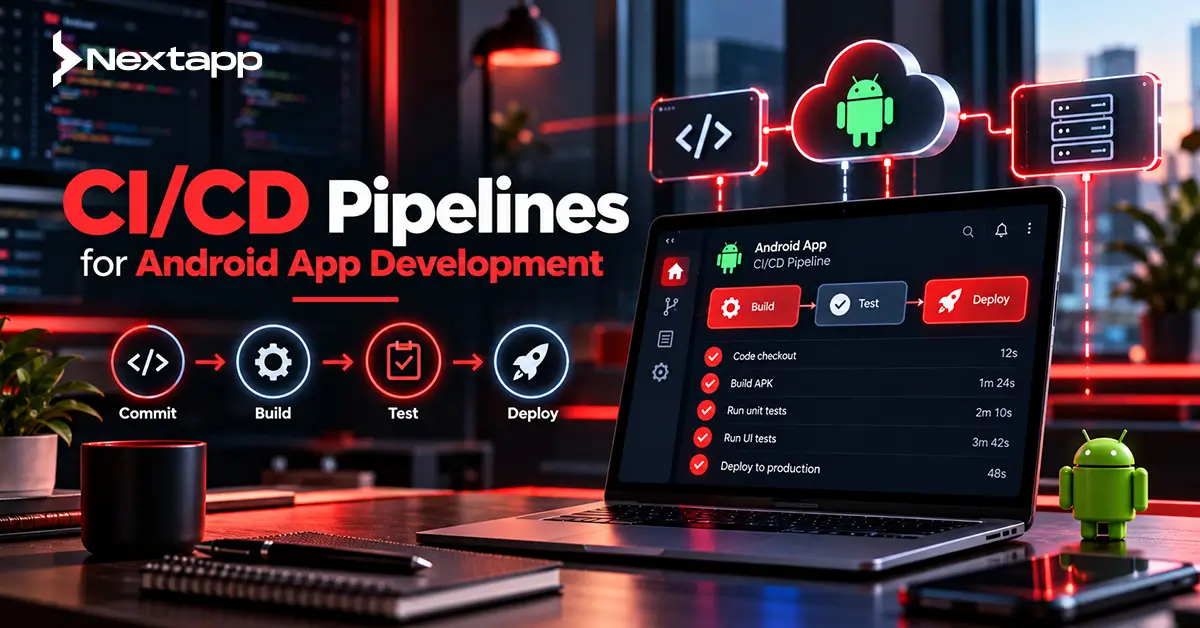
CI/CD pipelines for Android app development reduce these risks by turning the release process into a repeatable engineering workflow.
Continuous integration, or CI, automatically builds and tests code as developers contribute changes.
Continuous delivery or deployment, commonly grouped under CD, takes validated builds further through packaging, signing, testing tracks, release preparation, and potentially production distribution.
The goal is not simply to release faster.
A good Android CI/CD pipeline makes every release more predictable.
Start With a Repeatable Build
Before automating Android delivery, make sure the application can be built consistently from the command line.
Android projects normally use Gradle for build automation.
A CI environment should be able to:
Check out source code
Install required Android SDK components
Resolve dependencies
Run Gradle tasks
Produce the expected application artifact
For example, a pipeline may create:
Debug build
→ automated tests
Release build
→ signed Android App Bundle
If a developer needs to manually open Android Studio, click several menus, change configuration files, and copy secrets before the project builds correctly, the process is not ready for reliable CI.
Automation begins with reproducibility.
Trigger CI on Meaningful Code Changes
CI systems commonly run when developers:
Open a pull request
Push commits
Merge into the main branch
Different stages can run at different times.
A pull request may trigger:
Compile
→ static checks
→ unit tests
A merge to the main branch may trigger:
Full build
→ unit tests
→ integration tests
→ instrumented tests
A version tag or approved release branch may trigger:
Release build
→ signing
→ artifact validation
→ distribution
Not every commit needs to execute the most expensive test suite.
The pipeline should provide fast feedback early while reserving expensive validation for the stages where it provides the most value.
Run Static Checks Before Expensive Tests
Fast checks should usually run early.
These may include:
Compilation
Lint
Formatting checks
Static analysis
If the application does not compile, there is little value in immediately launching twenty Android emulators.
A pipeline can fail quickly and return useful feedback to the developer.
A simple order might be:
Compile
→ lint
→ unit tests
→ instrumented tests
This reduces wasted CI resources.
Automate Unit Testing
Unit tests should form one of the fastest quality gates.
They can validate:
Business logic
Data transformations
Validation
Repository behavior
ViewModels
Utility functions
For example, a subscription application might test:
Active subscription
→ premium feature available
Expired subscription
→ premium feature unavailable
These tests can usually run without starting an Android device.
Because they are fast, teams can execute them frequently.
A failed unit test should generally prevent the affected change from moving further through the pipeline.
Add Instrumented Testing Where It Matters
Some behavior needs an Android environment.
Instrumented tests may cover:
Database behavior
Navigation
Permissions
UI interaction
Platform APIs
Google supports automated Android testing through emulators and other managed testing environments.
Build-managed devices can be configured through Gradle so the build system creates, runs, and removes test devices automatically.
Teams can also define groups containing different:
API levels
Device profiles
Form factors
This makes it easier to detect problems caused by Android device differences before release.
Do Not Test Every Device on Every Commit
Android supports a huge range of hardware.
Attempting to run the entire device matrix after every small code change may make CI painfully slow and expensive.
Use a layered strategy.
Pull request:
Core unit tests
one representative device
Main branch:
Wider device matrix
Release candidate:
Critical API levels
important screen sizes
business-critical device profiles
Risk-based testing usually provides better value than blindly multiplying devices.
Use Test Sharding for Large Suites
Instrumented test suites can become slow as an application grows.
Build-managed devices support test sharding, which distributes tests across multiple device instances.
Instead of running:
1,000 tests sequentially on one emulator
a CI environment may divide them across several instances.
This can reduce overall execution time at the cost of additional infrastructure resources.
Engineering leads should monitor pipeline duration because a CI system that takes several hours to provide feedback may eventually discourage developers from using it effectively.
Protect Secrets From Source Control
CI/CD requires sensitive information.
Examples include:
Signing credentials
API credentials
Service-account credentials
Environment configuration
Never place production secrets directly inside the Git repository.
Use the secure-secret storage provided by the CI platform or another controlled secret-management system.
Access should follow least-privilege principles.
A pull-request build usually does not need permission to publish the production application.
Restrict publishing credentials to the release workflow.
Treat App Signing as Critical Infrastructure
Android release signing deserves special attention.
A build should not become production-ready merely because the compilation succeeded.
The pipeline must ensure that the correct signing configuration is applied to the correct release artifact.
Teams using Google Play App Signing still need to protect their upload-key workflow appropriately.
Signing credentials should not be freely available to every developer or every pipeline job.
A useful structure separates:
Development build
→ development credentials
Testing release
→ controlled test configuration
Production release
→ protected release process
This reduces accidental production signing and unauthorized release activity.
Separate Build Environments
Many Android products use more than one backend environment.
Examples include:
Development
→ development API
Staging
→ staging API
Production
→ production API
CI/CD should generate the correct application configuration for each environment without requiring developers to edit source files manually.
Build variants can help separate configurations.
However, do not package confidential server secrets into any variant.
Mobile environment configuration should include only values that are appropriate to exist inside the application.
Build the Artifact Once
One useful release principle is:
Build once, promote the same artifact.
Suppose QA tests version 4.5.2.
After approval, avoid rebuilding a slightly different 4.5.2 on someone's laptop before production.
The artifact that passed release validation should ideally be the artifact promoted toward production.
This reduces uncertainty.
Otherwise, the team may believe it tested one build while actually publishing another.
Store Android App Bundles and relevant metadata as traceable pipeline artifacts.
Connect Feature Development With App Prototyping
CI/CD should not begin only after the product is complete.
During app prototyping, teams should already decide how major features will be validated.
A prototype involving a complex authentication flow may reveal the need for specific integration tests.
A notification-heavy product may require dedicated testing around Firebase Cloud Messaging for Android push notifications.
A marketing journey may require automated checks based on the Android deep linking implementation guide.
Thinking about testability early makes automation easier later.
Automate Release Notes and Versioning Carefully
Release pipelines can reduce manual work around version management.
The process may automatically generate or validate:
Version code
Version name
Build number
Release notes
Commit reference
Every production artifact should be traceable back to its source code.
When a problem appears in version 7.3.1, the team should know exactly:
Which commit produced it
Which pipeline ran
Which tests passed
Which artifact was uploaded
Traceability makes incident investigation much faster.
Use Google Play Testing Tracks
Production should rarely be the first place a release is installed by anyone outside the development team.
Google Play provides different release tracks that can support staged validation.
A release workflow may progress through:
Internal testing
→ closed testing
→ broader testing
→ production
The exact process depends on the product and team.
Internal distribution can help developers, QA staff, and stakeholders evaluate a release using a more realistic installation path.
A candidate should progress only after the required quality gates pass.
Automate Google Play Publishing
The Google Play Developer API can automate several publishing operations.
This can support tasks such as:
Uploading application versions
Managing release tracks
Creating releases
Supporting staged rollout workflows
Automation reduces repetitive Play Console work.
However, full automatic production deployment is not appropriate for every organization.
A fintech, healthcare, or enterprise application may require explicit human approval before release.
A mature pipeline can still automate everything before that approval.
For example:
Build
→ tests
→ security checks
→ signed artifact
→ internal track
→ QA approval
→ production release
Automation and governance can exist together.
Use Staged Rollouts to Reduce Release Risk
A release that passes testing can still behave differently across a large production audience.
Staged rollout helps reduce that risk.
Instead of immediately distributing version 8.0 to every eligible user, a team may release it gradually.
During the rollout, monitor:
Crashes
ANRs
Backend errors
User feedback
Business-critical failures
When quality looks healthy, expand the rollout.
If serious problems appear, halt it before the affected audience becomes larger.
This turns production release into an observed process rather than one irreversible event.
Connect CI/CD With Production Monitoring
Deployment is not complete when Google Play accepts the release.
The pipeline should connect with monitoring.
For example:
Release deployed
→ observe crash rate
→ observe ANR rate
→ observe API failures
→ observe product KPIs
Performance topics such as Android app battery optimization techniques also matter after release.
A build can pass every automated functional test while still consuming too much battery in real user conditions.
Production quality needs both pre-release automation and post-release monitoring.
Prepare a Rollback and Recovery Strategy
Mobile rollback works differently from server rollback.
You cannot assume every installed device can instantly return to an earlier application build.
The team therefore needs several recovery options.
These may include:
Halting a staged rollout
Disabling a feature remotely
Reverting backend behavior
Releasing a corrective update
Feature flags can be valuable for high-risk functionality.
Suppose a new recommendation feature using AI and machine learning integration in Android apps causes unexpected production issues.
If the architecture supports remote feature control, the team may disable the feature without waiting for every user to install another binary.
Design for recovery before the incident happens.
Test Against Upcoming Android Changes
CI should not test only the current production configuration.
Android evolves continuously.
Teams should review what's new for Android developers in the latest Android OS release and add relevant preview or newer API environments to testing before those changes reach most users.
This can reveal:
Permission changes
Background restrictions
Compatibility issues
UI behavior changes
A proactive pipeline allows engineering teams to discover platform problems months before they become production emergencies.
Include Cross-Platform Delivery in the Wider Strategy
Companies using Flutter app development, React Native app development, or another cross platform app development approach still need platform-specific release automation.
Shared code does not eliminate:
Android signing
Android builds
Play testing tracks
Android device tests
Native iOS app development requires its own build, signing, testing, and App Store processes.
The overall product organization may share CI principles while maintaining separate platform delivery stages.
Standardize the Release Cadence
CI/CD produces the greatest organizational value when it turns releases into routine work.
A team should know:
Monday
→ features merge
Tuesday
→ automated validation
Wednesday
→ internal release
Thursday
→ QA approval
Friday
→ staged production rollout
The exact cadence will vary.
The important point is predictability.
Release day should not depend on one developer remembering twenty manual steps.
Professional Android app development services can help teams establish build automation, test infrastructure, signing controls, Google Play workflows, monitoring, and release governance around their product requirements.
A mature pipeline makes releasing less dramatic.
That is usually a sign it is working.
CI/CD Supports Faster Product Growth
CI/CD pipelines for Android app development allow engineering teams to release more confidently as the product becomes larger.
Every change can be built consistently.
Important tests can run automatically.
Release artifacts can remain traceable.
Google Play distribution can become more structured.
Production issues can be detected earlier.
This reliability also supports app store optimization indirectly because users experience more stable releases, fewer regressions, and faster fixes.
The goal of CI/CD is not maximum automation at any cost.
The goal is a release process that is fast enough for the business, controlled enough for the product, and repeatable enough that quality does not depend on memory.
Frequently Asked Questions
What is CI/CD in Android development?
CI/CD is an automated development and release process. Continuous integration builds and tests code changes frequently, while continuous delivery or deployment prepares validated builds for testing and production distribution.
Which CI tool should Android developers use?
Android projects can work with any CI system capable of running the required Gradle builds and Android tooling. The best option depends on the organization's source control, infrastructure, security, and existing engineering workflow.
Should instrumented Android tests run on every commit?
Not always. Fast unit and static checks can run on every change, while larger emulator or device matrices may run on main-branch builds, nightly workflows, or release candidates.
Can Google Play releases be automated?
Yes. The Google Play Developer API supports automation for tasks including application version uploads and release-track management. Organizations can still require manual approval before production publishing.
How should Android signing keys be handled in CI/CD?
Signing credentials should be stored securely and exposed only to authorized release jobs. They should never be committed directly to source control or made available unnecessarily to normal pull-request builds.
Does a cross-platform app still need Android CI/CD?
Yes. Flutter and React Native projects still require Android-specific compilation, testing, signing, App Bundle generation, Google Play publishing, and Android device validation even when some application code is shared across platforms.