An enterprise Android app rarely operates by itself.
A field-service app may need customer records from a CRM. A warehouse application may need inventory data from an ERP. A sales application may create orders in one system while retrieving pricing from another. An employee app may depend on identity, HR, accounting, and reporting platforms at the same time.
Android app API integration for enterprise systems connects these mobile workflows with the software already running the business.
The technical challenge is not simply sending an HTTP request and displaying a JSON response.
Enterprise environments often include legacy platforms, multiple authentication systems, inconsistent data formats, strict permissions, unreliable networks, large datasets, and integrations that cannot be exposed directly to mobile devices.
A well-designed integration architecture gives employees access to the information they need without tightly coupling the Android app to every internal system.
Start With the Business Workflow
API planning should begin with what the user is trying to accomplish.
Consider a sales representative creating an order from an Android tablet.
The process may require:
CRM
→ customer details
ERP
→ product availability
Pricing system
→ current contract pricing
Android app
→ order entry
ERP
→ final order creation
A feature description such as “connect the app to the ERP” does not explain enough.
The development team needs to understand:
What information is required
Which system owns that information
When it needs to be retrieved
Which system receives updates
What happens when one system is unavailable
Enterprise API integration works best when every data exchange supports a defined business action.
Identify the System of Record
Large organizations often store similar information in several platforms.
A customer's name might appear in:
CRM
ERP
Billing platform
Support system
Which one is authoritative?
The integration architecture should identify the source of truth for important information.
For example:
CRM
→ customer relationship details
ERP
→ inventory and order fulfillment
Identity platform
→ employee authentication
Accounting system
→ financial records
The Android application should not try to reconcile competing enterprise systems independently.
Where transformation or reconciliation is required, it usually belongs in a controlled backend or integration layer.
Avoid Direct Connections to Internal Databases
A mobile app should generally not connect directly to an enterprise database.
Direct database access creates serious problems around:
Security
Credentials
Schema changes
Access control
Network exposure
Business rules
Imagine an Android application connecting directly to an SQL database to retrieve inventory.
The mobile app now needs database credentials and knowledge of the database schema.
If the schema changes, the Android app may break.
If credentials are extracted, the database may be exposed.
A controlled API layer creates a safer boundary.
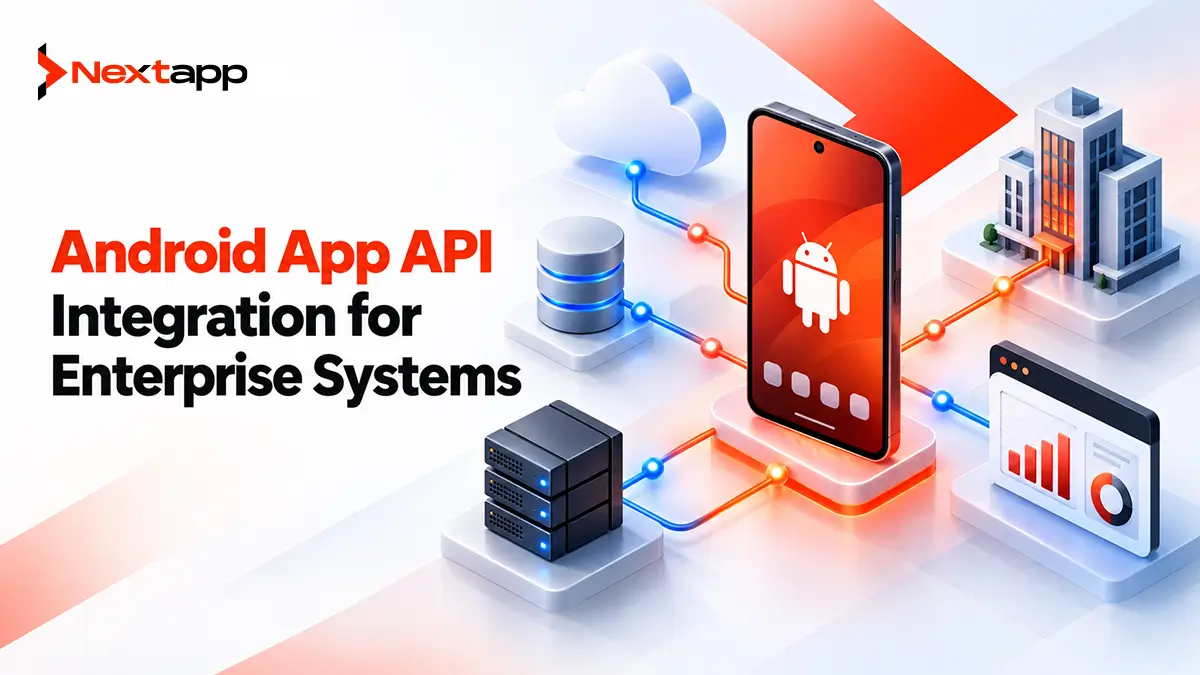
Android app
→ enterprise API
→ business services
→ database
The API can validate identity, enforce permissions, transform information, and protect internal implementation details.
Use an Integration Layer for Multiple Systems
Enterprise Android applications often need more than one backend platform.
Instead of making the app integrate directly with:
ERP
CRM
HR system
Billing system
Legacy database
a stronger architecture may use:
Android app
→ mobile backend or API gateway
→ enterprise systems
This layer can handle:
Authentication
Authorization
Data transformation
API orchestration
Rate limiting
Logging
Error handling
The Android client receives a cleaner contract.
For example, the app may request:
GET /mobile/customers/428
The integration layer can retrieve information from several internal systems and return one mobile-friendly response.
The app does not need to understand how many systems were involved.
Design Mobile-Friendly APIs
Enterprise systems are not always designed for mobile clients.
An ERP endpoint might return hundreds of fields when the Android screen needs only six.
Sending unnecessary information wastes:
Bandwidth
Processing
Battery
Development effort
A mobile API should return what the workflow actually requires.
For example, an inventory list may need:
Item ID
Item name
Available quantity
Location
It probably does not need every accounting, procurement, and manufacturing field stored in the ERP.
Mobile-friendly API contracts make applications easier to maintain and faster to use.
Keep API Calls Behind the Data Layer
Android screens should not contain raw networking logic.
A scalable architecture can use repositories to separate the UI from remote systems.
For example:
CustomerRepository
may communicate with:
Customer API
Local cache
InventoryRepository
may communicate with:
Inventory API
Room database
This approach supports scalable Android app architecture for SaaS platforms because networking behavior remains centralized instead of spreading through activities, fragments, or composables.
The UI asks for application data.
The repository decides how that data is obtained.
Never Store Enterprise Secrets in the App
Anything packaged inside an Android application should be treated as potentially discoverable.
Do not embed:
Database passwords
Backend private keys
Administrator credentials
Long-lived API secrets
inside application code or resources.
If an external enterprise platform requires a confidential credential, keep it on the backend.
A safer flow is:
Android user
→ authenticated mobile API
→ backend
→ enterprise system using protected server credential
This prevents thousands of employee devices from carrying a reusable enterprise secret.
Use User-Based Authentication
Enterprise applications often integrate with existing identity systems.
Authentication may involve:
OAuth 2.0
OpenID Connect
Enterprise single sign-on
Identity providers
Multi-factor authentication
The exact approach depends on the organization.
The important principle is that the user should receive a limited identity or access token rather than the Android app carrying a universal administrative credential.
The backend should then evaluate what that user is permitted to access.
Authentication answers:
“Who is making this request?”
Authorization answers:
“Can this person perform this action?”
Both are required.
Enforce Permissions on the Server
Hiding a button is not authorization.
Suppose managers can approve purchase requests while ordinary employees cannot.
The Android interface may hide the Approve button from employees.
However, the API must still reject an unauthorized approval request.
Otherwise, someone could potentially create the request manually.
Server-side permissions may depend on:
User role
Organization
Department
Record ownership
Workflow stage
This becomes especially important for Android apps for enterprise workflow automation, where one application may support workers, supervisors, managers, and administrators.
Protect Network Traffic
Enterprise data should be transmitted over secure connections.
Android provides Network Security Configuration to control networking security behavior at the application level.
Teams can use it to manage areas such as:
Trusted certificate authorities
Domain-specific configuration
Cleartext traffic restrictions
Debug-only overrides
Modern Android versions restrict cleartext traffic by default for appropriately targeted apps, but enterprise teams should still review their network configuration carefully.
Legacy internal systems sometimes continue using HTTP or unusual certificates.
Do not weaken the entire Android application's network security simply to connect to one old server.
A backend integration layer can often isolate the legacy system instead.
Handle Internal Certificates Carefully
Some enterprises operate services using internal certificate authorities.
Android supports custom trust configuration where required.
However, certificate handling should be managed deliberately.
Avoid writing networking code that simply trusts every certificate.
A permissive certificate validator may make development easier, but it can expose production traffic to interception.
Use proper certificate configuration for development, testing, and production environments.
Expect Enterprise APIs to Fail
An API integration should assume that failures will happen.
Possible problems include:
Server unavailable
Request timeout
Authentication expired
Network disconnected
Rate limit reached
Legacy system offline
Invalid data
Partial backend failure
The Android app needs useful behavior for each situation.
Avoid displaying:
“Error 500”
to a warehouse employee.
A better message may be:
“Inventory could not be refreshed. Your last synchronized data is still available.”
Technical logs can contain the information developers need while users receive clear operational guidance.
Use Retries Only for Safe Operations
Retry logic needs context.
A failed request to download a product catalog may be safe to repeat.
A request to create a financial transaction requires more care.
Repeated requests can cause duplicate actions if the backend is not designed correctly.
Operations should use stable request identifiers or idempotency mechanisms where appropriate.
This is particularly important for Android fintech app development considerations, where duplicate transfers or payments can have serious consequences.
Retry strategy should be designed together with the backend.
Build Offline Support When the Workflow Requires It
Field workers often cannot depend on constant connectivity.
An app may need to continue working when:
Mobile data disappears
Wi-Fi becomes weak
An employee enters a remote facility
This is where offline-first Android apps for field and enterprise teams become relevant.
A practical architecture may use:
Enterprise API
→ repository
→ Room database
→ UI
The employee works with local data.
Changes are stored locally and later synchronized with enterprise systems.
This prevents a temporary network problem from stopping the entire workflow.
Use WorkManager for Persistent Synchronization
Some synchronization tasks should continue even after the employee leaves the current screen.
WorkManager can be useful for persistent tasks such as:
Uploading completed reports
Sending queued changes
Refreshing assigned jobs
Uploading documents
Developers can define network conditions and retry behavior.
For example:
Employee completes inspection offline
→ data saved locally
→ synchronization work queued
→ network returns
→ WorkManager starts sync
→ backend accepts report
→ local status changes to synced
This process is more reliable than depending on one screen remaining open.
Resolve Data Conflicts Intentionally
Enterprise data can change in several places.
Suppose a field employee edits a customer address offline while an office employee changes the same address in the CRM.
When the Android device reconnects, which value should win?
Possible strategies include:
Server wins
Client wins
Latest update wins
Field-level merge
Manual review
The correct choice depends on the data.
A technician's inspection note may safely merge with a scheduling update.
Two competing inventory counts may require stronger reconciliation.
Conflict resolution is a business rule, not only a database problem.
Plan for Legacy Systems
Older enterprise systems may not provide modern REST APIs.
They may depend on:
SOAP
Proprietary protocols
Batch files
Scheduled exports
Older middleware
Do not force these details into the Android client.
Use an integration service that can translate older system behavior into a stable mobile API.
For example:
Android app
→ REST API
→ integration service
→ legacy SOAP service
When the legacy system is eventually replaced, the mobile API can remain stable.
This reduces the impact on the Android application.
Healthcare Integrations Need Additional Safeguards
Healthcare apps may connect to:
EHR systems
Scheduling platforms
Laboratory systems
Pharmacy platforms
Teams building HIPAA-compliant Android apps for healthcare providers need to evaluate how protected health information moves through every integration.
API design may need stronger controls for:
Data minimization
Authentication
Authorization
Logging
Encryption
Vendor relationships
Do not copy full patient records to the Android app when a workflow needs only a small portion of the information.
Design Integrations During Prototyping
API requirements should appear during app prototyping, not after every screen has been approved.
Suppose a prototype shows:
Customer
→ available products
→ live stock
→ place order
The team should immediately identify:
Which system owns customer data?
Where does inventory come from?
Can stock be retrieved quickly enough?
What happens offline?
Which system creates the order?
A screen can be easy to design while the required integration is extremely difficult.
Early technical discovery helps avoid building a user experience the enterprise systems cannot support.
Test With Real Enterprise Conditions
Do not test only against perfect mock APIs.
QA should include:
Slow responses
Expired tokens
Partial data
Duplicate requests
ERP downtime
Offline mode
Invalid permissions
Server errors
Enterprise environments often have maintenance windows and dependencies outside the mobile team's control.
The Android app should remain understandable when another system fails.
Cross-Platform Apps Need the Same Backend Boundaries
Organizations may use Flutter app development, React Native app development, or broader cross platform app development to serve Android and iOS users.
The mobile frameworks may differ, but the enterprise integration strategy should remain consistent.
Both platforms can communicate with the same controlled backend API.
Native iOS app development will still have different platform-specific storage, networking, authentication, and background-work considerations.
Shared backend contracts reduce duplicated enterprise integration logic across mobile platforms.
Public B2B Apps Still Need Clear Positioning
Some enterprise Android applications are distributed privately.
Others are public SaaS products on Google Play.
For public products, app store optimization should clearly explain:
Which business systems the app connects with
Which workflows it supports
Whether an enterprise account is required
Who the app is intended for
A warehouse application should not be presented as a generic productivity app.
Clear store positioning attracts users with the right expectations.
Build an Integration Architecture That Can Change
Enterprise systems rarely remain the same forever.
A company may replace its CRM.
An ERP may move to the cloud.
A legacy authentication platform may be retired.
If the Android application communicates directly with every enterprise system, each change can create a major mobile rewrite.
A controlled API and integration layer reduces that dependency.
Professional Android app development services can help organizations map enterprise workflows, design API contracts, integrate ERP and CRM platforms, support offline synchronization, protect authentication, and isolate legacy systems.
The best enterprise integration architecture does not expose every internal system to the Android app.
It gives the app one stable, secure way to access the information employees actually need.
Frequently Asked Questions
What is Android app API integration for enterprise systems?
It is the process of connecting an Android application with business platforms such as ERP, CRM, HR, inventory, accounting, and legacy systems through controlled APIs and integration services.
Should an Android app connect directly to an ERP database?
Generally, no. A controlled API or middleware layer provides stronger security, authorization, data transformation, and flexibility than exposing an internal enterprise database directly to mobile devices.
How should enterprise API credentials be stored?
Confidential backend credentials and private API secrets should remain on protected server infrastructure. Android apps should normally use limited user or session credentials rather than carrying shared enterprise secrets.
Can enterprise API integrations work offline?
Yes. The Android app can store appropriate information locally, queue changes, and synchronize them later. The backend still needs clear rules for authorization, duplicate requests, and conflict resolution.
How should Android apps integrate with legacy systems?
A middleware or backend integration layer can translate modern mobile API requests into the protocols or formats required by legacy systems. This keeps legacy details out of the Android client.
Can Flutter and React Native apps use the same enterprise APIs?
Yes. Android, iOS, Flutter, and React Native clients can use the same properly designed backend API. Each platform still needs appropriate handling for authentication, local storage, networking, and background synchronization.