A mobile app that works perfectly in the office may become almost useless when employees take it into the field.
Technicians enter basements with no signal. Delivery drivers travel through areas with unstable mobile coverage. Warehouse employees move between Wi-Fi dead zones. Inspectors visit remote sites. Healthcare workers may provide services in locations where internet access cannot be guaranteed.
These situations make offline-first Android apps especially valuable for field and enterprise teams.
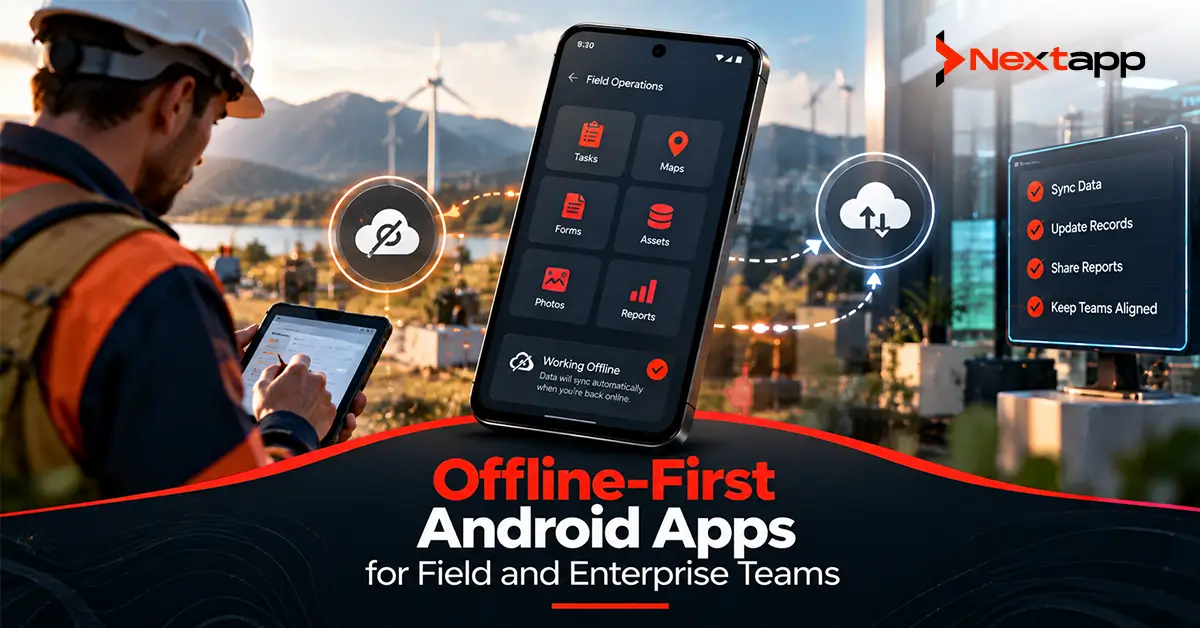
An offline-first app does not simply show a generic “No internet connection” message when connectivity disappears. It allows users to continue performing important parts of their work and synchronizes the resulting information when a network becomes available again.
The challenge is that offline support involves much more than caching a few screens.
Developers need to think about local databases, synchronization, queued writes, retries, conflicts, authentication, data security, API design, and what the user should see while information is waiting to reach the server.
A good offline-first app makes unreliable connectivity feel like a temporary technical condition rather than a reason employees cannot work.
Offline-First Does Not Mean Offline-Only
An offline-first application still uses the network.
The difference is that network access is not required for every useful action.
Consider a field technician assigned five service jobs in the morning.
Before leaving the office, the app synchronizes:
Job details
Customer information
Equipment records
Checklists
Required documents
The technician later enters an area with no signal.
They can still:
Open the assigned job
Read instructions
Complete a checklist
Add notes
Capture photos
Mark work complete
The app stores these changes locally.
When connectivity returns, synchronization sends them to the backend.
The worker continues working instead of waiting for a network connection.
Start With the Business Actions That Must Work Offline
Not every application feature needs offline support.
Trying to make the entire product work offline can create unnecessary complexity.
Start by identifying the critical workflow.
For a logistics application, offline requirements might include:
Viewing assigned deliveries
Updating delivery status
Capturing proof of delivery
Recording customer signatures
Live route optimization may still require connectivity.
For a field-service application, employees may need:
Work orders
Equipment history
Inspection forms
Photo capture
Real-time communication with dispatch may remain online-only.
The goal is to keep the essential business process moving.
This is especially important when designing Android apps for enterprise workflow automation, where downtime can directly reduce employee productivity.
Make the Local Database the App's Working Data Source
A common online-only application flow looks like this:
UI
→ API
→ server response
→ UI
When the network disappears, the flow breaks.
An offline-first architecture can instead look like:
Network
→ repository
→ local database
→ UI
The interface reads from local storage rather than depending directly on a successful network response.
When new information arrives from the backend, the repository saves it locally.
The UI observes the local data and updates automatically.
This creates a more consistent experience because the interface can continue showing useful information even when the network changes.
Use Room for Structured Local Data
Room is commonly used when Android applications need structured local database storage.
A field-service app might store entities such as:
Work orders
Customers
Assets
Tasks
Inventory
Sync records
For example, a locally stored job might contain:
Job ID
Customer ID
Status
Scheduled time
Location
Sync state
The UI reads this information from the local database.
If the user changes the job status while offline, the local record changes immediately and the synchronization system records that a server update is still required.
This gives the employee immediate feedback without pretending that the backend has already received the change.
Use Repositories to Coordinate Local and Remote Data
Repositories help keep network and database logic away from the UI.
A WorkOrderRepository, for example, might coordinate:
Room database
Enterprise API
Synchronization queue
The screen simply requests work orders from the repository.
It should not need logic such as:
“If network is available, call API, otherwise query database.”
The repository handles those decisions.
This becomes more important as scalable Android app architecture for SaaS platforms grows across multiple tenants, roles, and workflows.
A clear data layer keeps synchronization logic from spreading across dozens of screens.
Write Locally First When the Workflow Allows It
Suppose a technician changes a work order from:
IN_PROGRESS
to:
COMPLETED
while offline.
A useful offline-first approach may:
Update the local database.
Update the UI immediately.
Add the change to a synchronization queue.
Send it to the backend when connectivity returns.
Mark the local operation synchronized after server confirmation.
The user sees the result immediately.
However, the app should distinguish between:
“Saved locally”
and:
“Confirmed by server.”
This distinction becomes extremely important for sensitive workflows.
Not Every Action Should Be Completed Offline
Offline-first does not mean every operation should be accepted without server verification.
Consider a fintech app.
A user trying to transfer $5,000 while offline should not see:
“Transfer completed.”
when no backend system has authorized the transaction.
Broader Android fintech app development considerations require much more careful handling of offline financial actions.
The app might instead allow:
Transfer created
→ waiting for connection
→ submitted when online
→ server validates
→ actual result displayed
The same principle applies to inventory reservation, account permissions, or other actions where the server remains the authority.
Choose offline behavior according to business risk.
Create a Persistent Sync Queue
Offline changes need somewhere to wait.
A synchronization queue can track operations such as:
Update work order
Upload photo
Submit inspection
Create delivery record
Update inventory
Each queued operation may contain information such as:
Operation ID
Record ID
Operation type
Payload reference
Creation time
Retry count
Sync status
When connectivity becomes available, the synchronization process attempts the queued operations.
Successful operations can be removed or marked complete.
Failed operations can remain available for another attempt.
A persistent queue is important because app processes can be killed.
The synchronization state should not disappear simply because Android closed the application.
Use WorkManager for Reliable Background Synchronization
WorkManager is designed for persistent work that should continue even if the user leaves the screen or the application process is restarted.
It works well for tasks such as:
Uploading field reports
Synchronizing completed jobs
Sending cached updates
Downloading refreshed assignments
Developers can define network constraints so work runs when appropriate connectivity is available.
If synchronization fails temporarily, the task can be retried with backoff rather than repeatedly hitting the server every few seconds.
A common flow is:
Local write
→ enqueue sync work
→ wait for network
→ send operation
→ process response
→ update local state
This makes synchronization more reliable than depending on the user to reopen a particular screen.
Do Not Synchronize Everything at Once
A device reconnecting after several hours offline may contain many pending operations.
Sending every request simultaneously can create:
Server spikes
Battery drain
Duplicate processing
Poor performance
Design synchronization intentionally.
You may need to:
Order important operations
Batch compatible requests
Upload smaller records before large files
Retry failures separately
Avoid duplicate work
For example, a field report may need to be created before associated photographs can be attached.
Synchronization should understand these dependencies.
Design Idempotent Enterprise APIs
Retries create another problem.
Imagine the app sends:
“Create inspection report.”
The backend successfully creates the report, but the response never reaches the phone.
The app assumes the request failed and sends it again.
Without protection, the server may create two reports.
Good Android app API integration for enterprise systems should account for retry behavior.
One approach is to assign a unique operation ID.
The first request creates the report.
If the same operation ID arrives again, the server recognizes it instead of creating another record.
Idempotency is particularly useful for:
Work-order completion
Deliveries
Inventory updates
Financial requests
Form submissions
Offline-first architecture and backend API design need to be planned together.
Plan Conflict Resolution Before You Need It
Offline apps create one question that online-only systems can sometimes avoid:
What happens when the same information changes in two places?
Suppose a dispatcher changes a service job from:
Tuesday 10 AM
to:
Wednesday 2 PM
while the technician's offline device still contains the Tuesday schedule.
The technician then updates the job locally.
When the device reconnects, the app has two versions of the record.
Possible conflict strategies include:
Server Wins
The backend version always overrides the device.
Simple, but local work may be lost.
Client Wins
The mobile change replaces the server version.
Useful in limited cases but risky when multiple users edit shared information.
Last Write Wins
The most recent update is retained.
Simple to automate but timestamps do not always reflect business importance.
Merge Changes
Different fields can sometimes be combined.
For example, the server changed the scheduled time while the technician added a note.
Both changes may be preserved.
User Resolution
High-impact conflicts may require someone to choose the correct version.
There is no universal conflict strategy.
The correct rule depends on the workflow.
Make Sync Status Visible to Users
Employees need to know whether their work is safely stored.
Useful states may include:
Saved
Waiting to sync
Syncing
Synced
Sync failed
Avoid alarming users with technical language.
A simple message such as:
“Saved on this device. Will sync when you're online.”
is often enough.
When synchronization fails permanently because of a validation problem, the user may need a clear action.
For example:
“Report could not be submitted because the work order was closed by dispatch.”
Silent failure is dangerous in enterprise workflows.
Protect Offline Enterprise Data
Offline-first apps deliberately store more information on the device.
This increases the importance of local security.
Consider:
What information is cached?
How long is it retained?
What happens after logout?
What happens if the device is lost?
Are local files protected appropriately?
Healthcare applications need particular care.
Teams building HIPAA-compliant Android apps for healthcare providers may need to restrict how much patient information is stored offline, protect appropriate local data, and remove information when it is no longer required.
Offline functionality should not become an excuse to maintain unlimited sensitive records on every field device.
Control Data by User and Organization
Enterprise apps often support multiple users and organizations.
A worker logging out should not leave another employee with access to cached records.
Similarly, switching between organizations in a multi-tenant application should not display the previous organization's local data.
Local databases and repositories may need to account for:
User ID
Organization ID
Workspace ID
Access permissions
Backend authorization must still validate every synchronized action.
The phone should never be treated as the final authority for enterprise permissions.
Design Media Uploads Separately
Field apps frequently capture:
Photos
Videos
Signatures
Documents
These files may be much larger than normal database updates.
Do not treat a 20 MB video exactly like a small status change.
A practical synchronization process might:
Save the file locally.
Create a local database reference.
Add upload work to a queue.
Wait for suitable connectivity.
Upload the file.
Receive server confirmation.
Update the local record.
Large media may also require rules around:
Wi-Fi
Metered networks
Compression
Retry behavior
The user should be able to continue working while uploads happen in the background.
Build for Field Conditions, Not Office Conditions
Connectivity is only one part of field usability.
Employees may also work:
In direct sunlight
Wearing gloves
While standing
Around machinery
Under time pressure
Offline behavior should be tested in realistic conditions.
During app prototyping, simulate the complete job:
Open assignment
→ lose network
→ complete form
→ take photo
→ close app
→ reopen app
→ regain network
→ synchronize
Do not test offline mode only by turning Wi-Fi off for thirty seconds on a developer's desk.
Real workflows reveal problems much faster.
Cross-Platform Apps Need a Shared Sync Model
Businesses may choose Flutter app development, React Native app development, or another cross platform app development strategy for enterprise products.
The same offline principles still apply:
Local source of truth
Persistent queue
Retry logic
Conflict resolution
Backend idempotency
Platform-specific implementation may differ.
Android background scheduling and storage mechanisms are not identical to those used in native iOS app development.
Shared business logic can be valuable, but each platform's operating-system restrictions still need proper handling.
Offline Capability Can Be a Product Differentiator
For many enterprise products, offline functionality is not just a technical requirement.
It can be a competitive advantage.
A field-service platform that becomes unusable whenever mobile coverage drops may be difficult to adopt in industries where employees regularly work in basements, rural sites, industrial buildings, or remote facilities.
When a public enterprise product is distributed through app stores, app store optimization can highlight genuine offline capability where it solves an important customer problem.
Do not simply advertise “Works offline.”
Explain the useful outcome:
“Complete inspections and save field reports even without a connection.”
Benefits are more persuasive than technical labels.
Build Offline Around the Real Business Process
Offline-first Android apps for field and enterprise teams should make network instability less disruptive to real work.
The foundation is usually a strong data layer.
Local storage becomes the immediate source used by the interface. Repositories coordinate local and remote information. WorkManager can handle persistent synchronization. Queues protect unsent changes, while conflict rules determine what happens when different versions of the same data meet.
Professional Android app development services can help organizations decide which workflows genuinely need offline support and design the local database, API contracts, security, synchronization, retries, and user feedback around those requirements.
The goal is not to pretend the network does not exist.
It is to make sure important work does not stop every time the network disappears.
Frequently Asked Questions
What is an offline-first Android app?
An offline-first Android app allows users to perform some or all important functions without continuous internet access. Data and actions are stored locally and synchronized with remote systems when connectivity becomes available.
Should every Android app use an offline-first architecture?
No. Offline-first architecture adds synchronization, local storage, conflict handling, and testing complexity. It is most valuable when unreliable connectivity would otherwise prevent users from completing important work.
What is the best local database for an offline-first Android app?
Room is commonly used for structured local Android data. The appropriate storage approach depends on the type of information being stored and the application's architecture.
How does WorkManager help offline synchronization?
WorkManager can run persistent synchronization work when defined conditions, such as network availability, are met. It also supports retries and backoff for work that fails temporarily.
How should offline data conflicts be handled?
The correct approach depends on the business rules. Common strategies include server wins, client wins, last write wins, merging compatible changes, or asking the user to resolve important conflicts.
Can Flutter and React Native apps work offline?
Yes. Flutter and React Native applications can implement offline storage and synchronization. Teams still need to design persistent local data, queued operations, conflict handling, secure storage, and platform-appropriate background synchronization.