Android applications rarely fail in exactly the same way for every user.
A crash may affect only one Android version. An ANR may appear primarily on lower-memory devices. A new release may introduce a problem that affects only users following one particular workflow. Another issue may happen thousands of times but affect very few individual users.
Without production monitoring, teams often learn about these problems through support tickets, negative reviews, or declining usage.
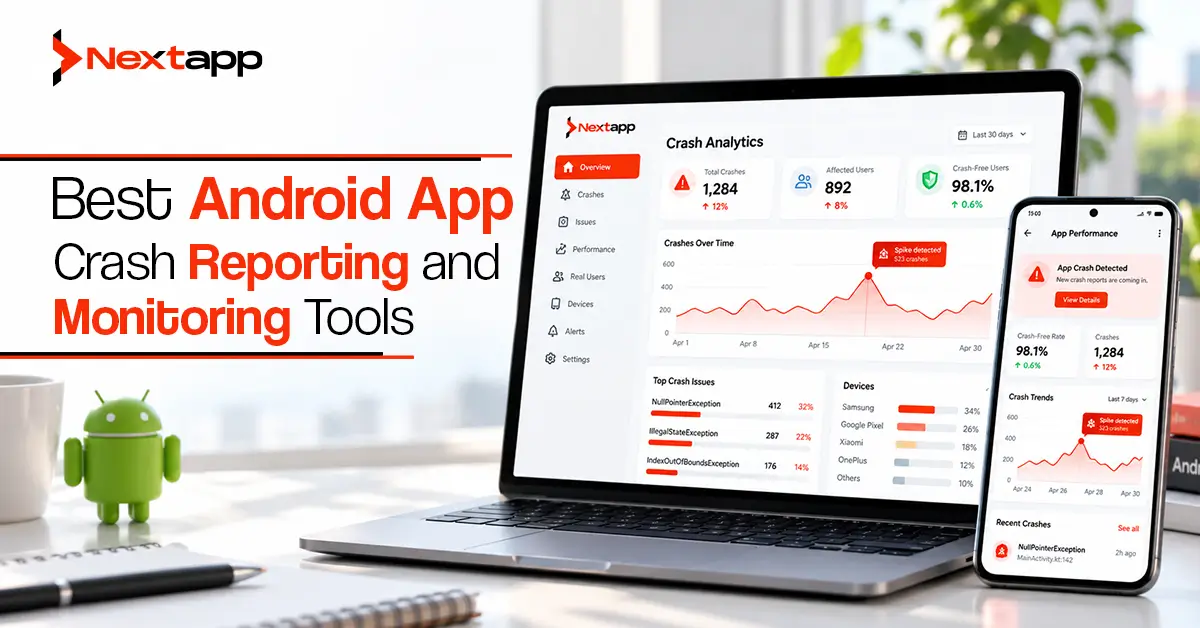
Android app crash reporting and monitoring tools give development teams a clearer view of what is happening after an app reaches real users. They can collect crashes, exceptions, ANRs, device details, application versions, stack traces, and other diagnostic information that helps engineers reproduce and prioritize failures.
Choosing the right platform is not simply a question of which product has the longest feature list.
Businesses should compare tools based on cost, integration effort, alerting, diagnostic depth, mobile focus, team workflow, and the wider technology stack already in use.
What Should an Android Crash Reporting Tool Do?
At a minimum, a useful crash-reporting platform should answer several questions.
- What failed?
- Where did it fail?
- Which application version is affected?
- How many users are affected?
- Which Android devices or operating system versions are involved?
- Did the issue start after a particular release?
- Can the engineering team reproduce the conditions surrounding the failure?
Good tools reduce the amount of raw data engineers need to examine manually.
Instead of showing 20,000 individual instances of the same crash, the platform should group related events and help the team understand the impact.
For Android applications, ANR visibility is also particularly important. An app can become unusable without technically crashing, so teams should not evaluate monitoring platforms only on exception reporting.
The Best Android Crash Reporting Tools at a Glance
| Tool | Best Fit | Cost Approach | Android Crash/ANR Monitoring | Alerting | Integration Effort |
|---|---|---|---|---|---|
| Firebase Crashlytics | Firebase and Android-focused teams | Core Crashlytics is no-cost | Strong | Strong | Low |
| Sentry | Teams needing wider application observability | Usage and plan based | Strong | Strong | Low to moderate |
| BugSnag | Teams focused on release stability and prioritization | Free and paid tiers | Strong | Strong | Low to moderate |
| Embrace | Mobile-first teams needing deep session context | Free tier and session-based paid plans | Strong | Strong | Moderate |
| Instabug | Mobile teams wanting monitoring plus user feedback | Commercial plans | Strong | Strong | Moderate |
There is no universal winner.
A startup using Firebase may reach a very different decision from a large company operating Android, iOS, web, and backend systems.
1. Firebase Crashlytics
Firebase Crashlytics is one of the most familiar options for Android development teams.
It is particularly attractive when the application already uses other Firebase products.
Crashlytics can capture:
- Fatal crashes
- Non-fatal exceptions
- ANRs
- Stack traces
- Application versions
- Device information
- Custom logs
- Custom keys
It also groups related failures so teams can focus on issues rather than reviewing every event independently.
Where Crashlytics Works Well
Crashlytics has a relatively low barrier to entry for Android teams.
The SDK integrates naturally with Android projects, and teams already using Firebase Analytics, Remote Config, Performance Monitoring, or other Firebase services may prefer keeping application quality data within the same environment.
Cost is also a major advantage because the core Crashlytics service is available without a direct charge.
For startups and smaller engineering teams, this can make it an effective default choice.
Alerting
Crashlytics can alert teams about events such as:
- New fatal issues
- New ANRs
- Regressed issues
- Trending problems
- Rapid increases in a particular issue
Teams can also connect alerts with services such as Slack, Jira, and PagerDuty.
Where Crashlytics May Be Less Suitable
Crashlytics is highly useful for application stability, but organizations looking for broader full-stack observability may eventually want more extensive tracing, infrastructure correlation, session analysis, or cross-system diagnostics.
Its strongest fit is often an Android or Firebase-centered team that wants reliable crash monitoring without introducing a larger observability platform.
2. Sentry
Sentry is broader than a traditional mobile crash reporter.
It can be used across mobile applications, web applications, backend services, and other systems, making it particularly useful when engineering teams want to investigate problems across several layers of a product.
For Android teams, Sentry can capture application errors and provide contextual information around the event.
Recent Android capabilities have also improved native crash diagnostics, making Sentry increasingly relevant for applications containing native Android or C/C++ components.
Where Sentry Works Well
Sentry is a strong option for businesses operating more than one technical platform.
For example, a SaaS company may have:
- Android app
- iOS app
- Web application
- Backend API
- Worker services
Using one observability environment can help engineers investigate whether a mobile failure is connected with a backend problem rather than treating every platform independently.
This can also be valuable for businesses investing in cross platform app development, where product failures may involve shared services even though the user experience differs across devices.
Alerting and Monitoring
Sentry provides monitoring and alerting capabilities that can route important issues through channels such as email, Slack, and incident-management systems.
The platform has also expanded beyond error reporting into areas such as performance, tracing, application metrics, and mobile session context.
Where Sentry May Be Less Suitable
The breadth of Sentry can be unnecessary for a very small Android-only application.
A team that simply wants basic crash reporting may find Firebase Crashlytics easier to introduce.
Sentry becomes more compelling as product architecture, platforms, and monitoring requirements grow.
3. BugSnag
BugSnag focuses strongly on application stability and helping development teams prioritize the errors that matter most.
Its Android integration can automatically report crashes and ANRs while collecting contextual information such as:
- Stack traces
- Device details
- App version
- Memory information
- Network state
- Breadcrumbs
- Active screen
This can make it easier to determine why a problem affects a specific group of users.
Where BugSnag Works Well
BugSnag is particularly useful for engineering teams that want to connect crashes with release quality.
Instead of viewing crash reporting purely as an inbox of exceptions, teams can use stability information to evaluate whether a release is healthy enough to continue rolling out.
This approach can be useful for established products with regular release cycles.
The platform also offers performance monitoring alongside error monitoring.
Teams already working through Android app performance optimization techniques may therefore find value in connecting stability and performance information rather than examining the two separately.
Alerting
BugSnag provides notifications for events such as:
- New errors
- Regressions
- Error spikes
- Performance conditions
Integrations can connect monitoring with development and incident-response workflows.
Cost Considerations
BugSnag provides both free and paid options, with more advanced capabilities available as team and monitoring requirements grow.
Businesses should estimate error volume and performance-monitoring needs before selecting a tier.
4. Embrace
Embrace takes a distinctly mobile-first approach to observability.
Crash reports are connected with detailed mobile session context, allowing engineers to examine what happened around the failure instead of relying only on the stack trace.
Depending on configuration and plan, teams can investigate information involving:
- Crashes
- Exceptions
- ANRs
- Network activity
- User actions
- Device conditions
- Performance
- Session behavior
Where Embrace Works Well
Embrace can be especially useful when reproducing the failure is difficult.
Consider an app that crashes only when a user:
- Opens a particular screen.
- Switches networks.
- Returns to another screen.
- Performs a specific action.
A stack trace may identify where the failure occurred.
Session context can help explain how the user reached that state.
This can reduce the gap between detecting a crash and understanding the conditions behind it.
Alerting
Embrace provides configurable alerts for areas including crashes and ANRs.
Teams can define conditions according to factors such as event volume and affected users and route notifications into existing engineering workflows.
Cost Considerations
Embrace provides a free option for smaller usage levels and paid plans based around session consumption.
This model makes volume forecasting important.
A high-traffic consumer application should estimate session levels before comparing total monitoring costs with event-based alternatives.
5. Instabug
Instabug is another mobile-focused platform that combines crash reporting with a wider set of mobile quality tools.
Its broader environment includes capabilities related to:
- Crash reporting
- Performance monitoring
- Session replay
- Bug reporting
- Release management
- User feedback
This combination can appeal to mobile teams that want engineering diagnostics and direct user feedback within the same ecosystem.
Where Instabug Works Well
Consider a consumer application where users frequently encounter complicated interface problems.
A traditional crash-reporting system may tell developers that a failure happened.
A broader mobile quality platform can provide more context about the user journey and may also give users a direct way to report problems.
This is particularly useful when the product team wants to connect technical reliability with user experience.
Where Instabug May Be Less Suitable
A team interested only in basic crash collection may not need the wider platform.
Businesses should evaluate whether features such as session replay, bug reporting, release management, and user feedback justify the additional platform investment.
Crash Reporting Does Not Replace ANR Investigation
Monitoring tools help teams discover ANRs, but the tool does not automatically explain every root cause.
Once an ANR is identified, teams still need a technical process for debugging and fixing Android ANR errors.
This may involve examining:
- Main-thread work
- Disk I/O
- Database operations
- Lock contention
- Broadcast receivers
- Services
- Thread traces
The monitoring platform helps identify the affected users, versions, devices, and recurring patterns.
Engineering analysis still determines the fix.
Crash Monitoring Should Work With Pre-Release Testing
Production monitoring should not become an excuse to release poorly tested builds.
A stronger quality strategy combines production crash reporting with Android UI testing with Espresso and other appropriate automated and manual testing methods.
Pre-release tests help prevent known failures.
Production monitoring finds problems that escaped testing or appeared under real-world conditions.
Both are necessary because no test environment can recreate every device, account, network, and user behavior.
Device Context Matters
Android has a large hardware and software ecosystem.
A crash that looks random across all users may become obvious after filtering by:
- Device model
- Manufacturer
- Android version
- Memory
- Application version
This is where monitoring connects directly with Android device fragmentation testing strategies.
If production data repeatedly shows problems on one group of devices, QA teams can add those devices or similar hardware profiles to the test matrix.
Production monitoring should continuously improve pre-release testing.
Think About Monitoring During Prototyping
Crash monitoring may feel like something that belongs near launch.
Some decisions should happen earlier.
During app prototyping and technical planning, teams should determine:
- Which failures are business critical
- Which user journeys require monitoring
- Which custom events or attributes may help debugging
- Whether sensitive information could appear in diagnostic data
- Which teams need alerts
An enterprise healthcare product, for example, may have stricter data-handling requirements than a simple entertainment app.
Monitoring architecture should reflect those requirements before SDKs begin collecting production information.
Crash Monitoring Across Mobile Frameworks
The best platform may also depend on how the application is built.
Teams using Flutter app development should confirm that the selected platform supports Flutter crash reporting and provides enough native Android context for debugging Android-specific failures.
The same consideration applies to React Native app development.
Native iOS app development teams may prefer a monitoring platform that allows Android and iOS engineering groups to work within one environment.
Businesses with several mobile frameworks should compare the quality of each SDK rather than selecting a vendor only because its marketing page says it supports multiple platforms.
Monitoring Supports App Store Performance
Crash reporting is not a replacement for app store optimization, but the two strategies are connected.
Strong screenshots, keywords, and descriptions may increase installations.
Poor application stability can undermine those gains through:
- Negative reviews
- Low ratings
- Uninstalls
- Reduced retention
Acquiring more users for an unstable app simply exposes more people to the same technical problems.
Monitoring helps teams protect the product experience behind the store listing.
How to Choose the Right Tool
For many Android-first startups, Firebase Crashlytics is an excellent starting point because of its low integration barrier and no-cost core service.
Sentry becomes attractive when a business needs broader observability across mobile, web, and backend systems.
BugSnag is worth considering when release stability, structured error prioritization, and performance monitoring are major priorities.
Embrace is particularly strong when deep mobile session context and ANR investigation are important.
Instabug can make sense for teams that want crash reporting alongside broader user feedback and mobile experience tools.
Professional Android app development services can also help businesses evaluate monitoring requirements, integrate the selected SDK safely, configure alerts, manage symbol and mapping files, and establish a release process around production stability.
The best tool is ultimately the one your team will actively use to find, prioritize, and fix failures.
Frequently Asked Questions
What is the best crash reporting tool for Android?
Firebase Crashlytics is a strong choice for many Android teams, particularly when they already use Firebase. Sentry, BugSnag, Embrace, and Instabug may be better when broader monitoring or deeper mobile diagnostics are required.
Is Firebase Crashlytics free?
Core Firebase Crashlytics is currently available as a no-cost Firebase product. Other Firebase or Google Cloud services connected to a project may have separate pricing.
Can crash reporting tools detect Android ANRs?
Several major Android monitoring platforms, including Crashlytics, BugSnag, and Embrace, provide ANR monitoring. Teams should confirm the exact ANR capabilities and SDK requirements of the platform they choose.
Do I still need testing if I use crash monitoring?
Yes. Automated and manual testing help prevent problems before release, while crash monitoring identifies failures occurring in real production environments.
Should startups use the same monitoring tools as enterprises?
Not necessarily. Startups may prioritize low cost and simple integration, while larger organizations may require advanced alerting, cross-platform observability, compliance controls, longer retention, and deeper team workflows.
Should Android and iOS apps use the same crash monitoring platform?
They can, especially when one engineering organization supports both platforms. However, the quality of each platform-specific SDK, diagnostic information, pricing, and workflow should be evaluated before choosing a shared solution.