A mobile app development timeline for MVP can usually be shortened by defining the scope clearly, prioritizing only essential features, completing discovery early, using wireframes before full design, choosing the right technology stack, reducing approval delays, and testing throughout development instead of waiting until the end. Most MVP delays happen because the product scope is too large, requirements are unclear, stakeholders change direction, or teams start building before the app is properly planned.
An MVP, or minimum viable product, is not supposed to be a complete version of the app. Whether you are building through Android app development, mobile web app development, or cross-platform app development, it is the first usable version built to test the core idea with real users. The faster you can launch a stable MVP, the sooner you can collect feedback, validate demand, improve features, and decide where to invest next.
For startups and businesses, shortening the MVP timeline is not about rushing the project. It is about removing waste from the process. A shorter timeline still needs strong planning, clean design, reliable development, quality assurance, user acceptance testing, app store submission, and launch preparation.
What a Mobile App Development Timeline for MVP Usually Includes
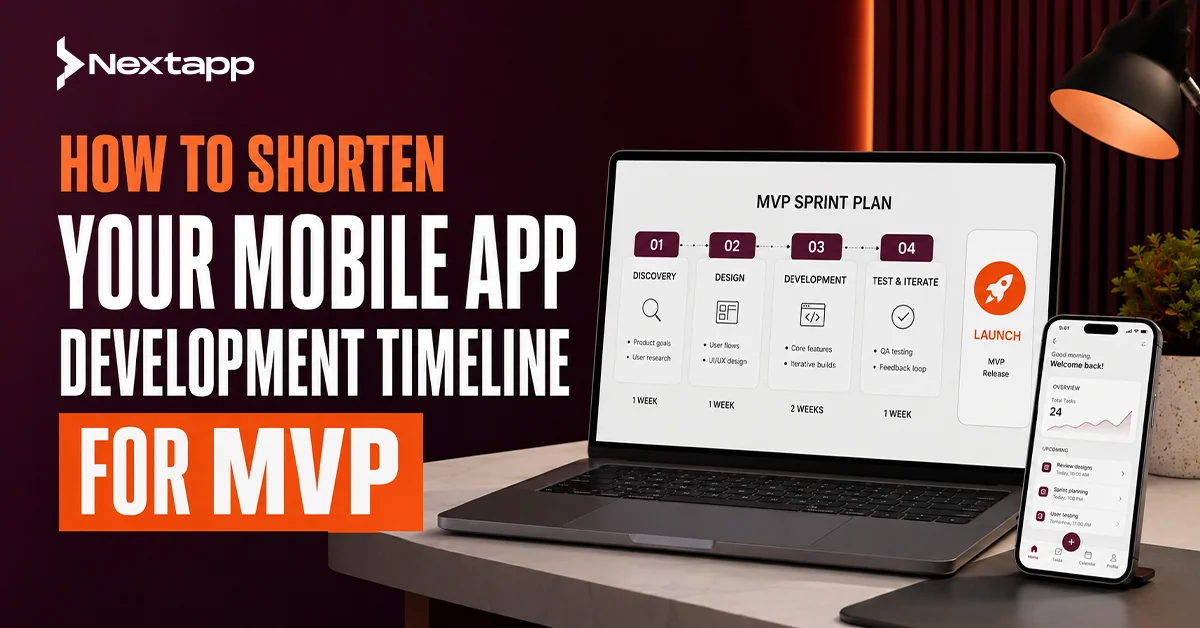
A mobile app development timeline for MVP usually includes discovery, market research, requirement gathering, feature prioritization, MVP scope definition, wireframing, UI/UX design, technical planning, backend setup, frontend development, API integration, quality assurance, user acceptance testing, bug fixing, app store submission, launch preparation, and post-launch iteration.
Each phase plays a role. Skipping important steps can create bigger delays later. For example, avoiding discovery may save one week at the beginning but cause four weeks of rework during development. Ignoring quality assurance may speed up coding but delay launch because the app fails testing.
The best way to shorten an MVP timeline is to run the process in a focused way. Every phase should have a clear purpose, a fixed output, and a decision-maker responsible for approvals.
A simple MVP may take eight to twelve weeks. A moderate MVP may take twelve to sixteen weeks. A more complex MVP with user roles, payments, integrations, admin panels, and custom backend systems may take four to six months. These ranges vary based on app complexity, team size, technology, and decision speed.
Start With a Tight Discovery Phase
The discovery phase sets the direction for the MVP. This is where the team understands the business goal, users, market, core problem, app features, risks, technical needs, and launch priorities.
Many businesses want to skip discovery because they believe it slows down development. In reality, a focused discovery phase often shortens the total mobile app development timeline for MVP because it prevents confusion later.
Discovery should answer practical questions. Who is the app for? What problem does it solve? Which features are essential for launch? Which features can wait? What platforms are needed first? What integrations are required? What does success look like after launch?
A good discovery phase does not need to last months. For an MVP, one to two weeks may be enough if the stakeholders are available and the app idea is not overly complex.
Keep Discovery Focused on Decisions
Discovery should not become endless brainstorming. The goal is to make decisions that help the team build.
The output should include a clear product brief, user roles, feature list, MVP scope, technical assumptions, timeline estimate, and launch priorities. Once these items are approved, the team can move forward with confidence.
Use Market Research to Avoid Building the Wrong Features
Market research helps shorten the MVP timeline by preventing unnecessary development. A team that understands user needs and competitor behavior can avoid building features that do not support validation.
Market research does not need to be overly complicated for an MVP. Review competitor apps, customer reviews, user complaints, pricing models, app store feedback, social media discussions, and common feature expectations in your category.
For example, if you are building a booking app, users may expect calendar availability, reminders, location details, and simple rescheduling. If you are building a fitness app, users may expect progress tracking, routines, reminders, and clear onboarding. Research helps you understand what matters most.
The goal is not to copy competitors. The goal is to identify what users already expect and where your MVP can offer clear value.
Use Research to Cut Features, Not Add More
Market research often creates a long list of feature ideas. This can slow the project if every idea is added to the MVP.
Use research to prioritize. Keep features that support the core user action. Move everything else to a future phase.
Improve Requirement Gathering Before Design Begins
Requirement gathering is where the app idea becomes a usable plan. Weak requirements create delays because designers and developers are forced to guess.
Good requirements explain what each user should be able to do. They should include user roles, workflows, must-have features, technical dependencies, content needs, admin needs, and business rules.
For example, “users need payment” is too vague. A better requirement is: “Users should be able to choose a plan, pay through Stripe, receive confirmation, and manage subscription status from their account.”
Clear requirements make design faster, development smoother, and testing easier.
Write Requirements in Plain Language
Requirements do not need to be written like engineering documents. They should be clear enough for business stakeholders, designers, developers, and testers to understand.
Plain language reduces confusion. It also helps stakeholders approve the scope faster.
Define the MVP Scope Before Development Starts
MVP scope definition is one of the biggest factors in timeline control. A project slows down when the team keeps adding features during development.
The MVP should focus on the core value of the app. Ask one question: what is the smallest useful version that can solve the main user problem?
For a marketplace MVP, the core may include user registration, listings, search, booking or purchase, payments, messaging, and admin controls. Advanced analytics, loyalty systems, referral programs, and AI recommendations can usually wait.
For a learning app MVP, the core may include user login, course access, lesson progress, quizzes, and basic admin content management. Gamification, certificates, leaderboards, and advanced personalization can come later.
A tight MVP scope helps the team build faster and launch with fewer risks.
Separate Version One From Version Two
Create two lists: launch features and post-launch features. The launch list should be short and essential. The post-launch list can include improvements based on user feedback.
This keeps the product moving without losing good ideas.
Prioritize Features With a Simple Scoring Method
Feature prioritization helps shorten development time by removing emotional decision-making. Instead of debating every feature, score each one based on value, effort, risk, and urgency.
A high-value, low-effort feature may belong in the MVP. A low-value, high-effort feature should usually wait. A high-risk feature may need early technical validation before full development.
Feature prioritization works best when all stakeholders agree on the scoring method. This avoids scope arguments later.
Focus on the Main User Journey
The MVP should support the main user journey from start to finish. For example, a booking app should let users discover a service, select a time, book, receive confirmation, and manage the booking.
Features outside that core journey should be questioned carefully. They may be useful later, but they may not be needed for launch.
Use Wireframing to Save Design and Development Time
Wireframing is one of the fastest ways to shorten the mobile app development timeline for MVP. Wireframes show the structure of each screen before the final design is created.
A wireframe does not need colors, images, or polished branding. It focuses on layout, content placement, buttons, user flow, and screen logic.
Wireframes help stakeholders approve the app structure early. They also help developers understand how features connect before full UI design begins.
Skipping wireframes often causes delays because design problems appear later when changes are more expensive.
Approve User Flow Before Visual Design
Before spending time on polished UI/UX design, approve the user flow. Make sure users can move through the app logically.
A beautiful screen does not matter if the flow is confusing. Wireframes make these issues easier to catch early.
Keep UI/UX Design Practical for MVP
UI/UX design is important, but an MVP does not need every animation, illustration, or advanced interaction in the first version. The design should be clean, easy to use, and aligned with the brand.
A practical MVP design includes onboarding, navigation, core screens, forms, buttons, empty states, error states, and confirmation screens. It should also account for mobile responsiveness, accessibility, and platform expectations.
Overdesigning the MVP can slow the project. Custom animations, complex transitions, and highly detailed visual effects may be better for later versions unless they are central to the app experience.
Use a Design System or Component Library
A design system can reduce UI/UX design time. Buttons, forms, cards, icons, headers, footers, navigation bars, and alerts can be reused across the app.
Reusable components also make frontend development faster because developers do not need to build every screen from scratch.
Complete Technical Planning Before Coding
Technical planning helps prevent delays during development. This phase defines the app architecture, technology stack, backend needs, APIs, database structure, authentication, hosting, security, and deployment approach.
Many timeline problems happen when developers begin coding before technical decisions are complete. The team may later discover that an integration does not support a needed feature, the backend structure is weak, or the selected stack does not fit the product.
Technical planning should include platform choice, cross-platform framework selection, backend setup, third-party services, admin panel needs, analytics tools, and app store requirements.
Choose the Right Technology Stack for Speed and Stability
The right stack depends on your MVP goals. Flutter or React Native may help startups build iOS and Android apps faster with one codebase. Native development may be better for apps with heavy platform-specific needs. A backend-as-a-service option may speed up simple MVPs, while custom backend development may be better for complex products.
The fastest option is not always the best if it creates maintenance problems later. Choose a stack that supports both launch speed and future growth.
Reduce Backend Setup Time With Smart Architecture
Backend setup can become a major timeline factor. The backend may handle user accounts, authentication, data storage, admin controls, payments, notifications, APIs, analytics, and business logic.
To shorten the timeline, keep the backend focused on MVP needs. Avoid building complex admin tools, custom analytics systems, or advanced automation unless they are essential for launch.
For some MVPs, Firebase, Supabase, AWS Amplify, or similar services can speed up backend setup. For more complex apps, a custom backend may still be necessary.
Avoid Backend Overbuilding
A common mistake is building a backend for a future enterprise product before validating the MVP. This can add weeks or months.
Build what the MVP needs now, but structure it so it can grow.
Speed Up Frontend Development With Reusable Components
Frontend development includes the screens users interact with. This can move faster when the design uses reusable components and the app flow is clearly approved.
Developers should build shared components for buttons, cards, input fields, modals, lists, tabs, headers, and navigation. This reduces repeated work and creates a more consistent experience.
Frontend delays often happen when design changes keep coming after development has started. To avoid this, finalize core screens before coding begins, then keep changes controlled through a clear approval process.
Build Core Screens First
Start with the screens that support the main user journey. This helps the team test the MVP flow early.
Secondary screens can follow once the core journey works.
Plan API Integration Early
API integration can create unexpected delays if not planned early. Apps often need payment gateways, maps, booking systems, CRMs, email tools, SMS services, analytics platforms, social login, or third-party databases.
Before development begins, confirm API availability, documentation, access keys, pricing, rate limits, security requirements, and testing environments.
If your app depends on a third-party API, test it early. Do not wait until the final development phase to discover that the API does not support a key feature.
Use Mock APIs When Needed
If the backend or third-party API is not ready, developers can use mock APIs to keep frontend development moving. This allows screen development and user flow testing to continue while backend work progresses.
Mock APIs should be replaced and tested with real APIs before launch.
Run Quality Assurance Throughout Development
Quality assurance should not be saved for the end. Testing throughout development helps catch bugs earlier and reduces the final cleanup period.
QA should cover functionality, usability, device compatibility, performance, forms, navigation, errors, permissions, and edge cases. For mobile apps, testing on real devices is important because emulators do not always show every issue.
A short QA cycle after every sprint is better than one large testing phase at the end.
Create Test Cases From Requirements
Requirements should be turned into test cases. If a requirement says users can reset their password, QA should test the full reset flow, including email delivery, invalid links, new password rules, and login after reset.
This makes testing more structured and reduces missed issues.
Use User Acceptance Testing Before Launch
User acceptance testing, or UAT, allows stakeholders or selected users to test the app before launch. UAT confirms whether the app meets business expectations and supports real user workflows.
UAT should not be treated as casual feedback. It should have a clear testing script, expected results, and a system for reporting issues.
The best time for UAT is after the main features are built and internal QA has resolved major bugs. If UAT starts too early, testers may get distracted by unfinished screens. If it starts too late, important feedback may delay launch.
Limit UAT Feedback to MVP Goals
UAT often creates new ideas. Some are useful, but not all belong before launch.
Separate bugs from enhancements. Bugs should be fixed before launch. Enhancements can move to post-launch iteration unless they affect the core MVP.
Manage Bug Fixing With Clear Priorities
Bug fixing can delay launch when every issue is treated equally. Bugs should be categorized by severity.
Critical bugs block core functionality. High-priority bugs affect important user actions. Medium-priority bugs create inconvenience but do not block launch. Low-priority bugs may be cosmetic or rare.
The MVP should not launch with critical bugs. It may launch with minor known issues if they do not affect user trust, payments, security, or core app usage.
Freeze New Features During Bug Fixing
A feature freeze helps protect the launch timeline. Once the MVP enters final testing, avoid adding new features unless they are essential.
New features create new bugs, new testing needs, and new delays.
Prepare for App Store Submission Early
App store submission can add unexpected time. Apple App Store and Google Play require app descriptions, screenshots, icons, privacy policies, permissions, age ratings, testing notes, compliance answers, and review approval.
Do not wait until development is complete to prepare these assets. App store submission should begin during launch preparation.
Apple review may take time, and rejection can happen if the app has bugs, missing privacy details, payment policy issues, or unclear permissions. Google Play also has review and policy requirements.
Create Store Assets Before Final Build
Prepare app name, description, keywords, screenshots, preview content, support URL, privacy policy, and contact information before the final build.
This keeps submission from becoming a last-minute blocker.
Launch Preparation Should Start Before the App Is Finished
Launch preparation includes analytics setup, crash reporting, app store assets, website updates, support documentation, onboarding messages, email flows, marketing content, and internal team readiness.
A good MVP launch is not only a technical release. It is a controlled release that helps you learn from users.
Set up tools to measure installs, signups, retention, feature usage, crashes, support requests, and conversions. Without tracking, you will not know whether the MVP is working.
Plan a Soft Launch When Possible
A soft launch means releasing the app to a smaller group before promoting it widely. This helps identify issues before a larger audience arrives.
For many MVPs, a soft launch is safer than a full public launch on day one.
Use Post-Launch Iteration to Keep the MVP Lean
Post-launch iteration is the reason you do not need to build everything before launch. Once real users test the MVP, you can make better decisions.
User feedback may show that some planned features are not important. It may also reveal problems you did not expect.
Post-launch iteration can include bug fixes, usability improvements, feature enhancements, performance updates, onboarding changes, and new integrations.
Let Real User Data Guide the Roadmap
A roadmap built only from internal opinions can become bloated. A roadmap shaped by user behavior is usually more accurate.
Track what users do, where they drop off, which features they use, and what feedback they share.
Typical MVP Timeline Ranges
A simple MVP may take eight to twelve weeks. This usually includes basic user accounts, simple UI, limited screens, and minimal backend complexity.
A moderate MVP may take twelve to sixteen weeks. This may include user roles, admin panel, payments, notifications, API integrations, and more complete design.
A complex MVP may take four to six months or longer. This may include real-time features, advanced backend logic, complex permissions, marketplace features, healthcare or fintech compliance, AI features, or multiple third-party integrations.
These are general timeline ranges. The real timeline depends on scope, team size, decision speed, design complexity, backend needs, and testing requirements.
Common Reasons MVP Timelines Get Delayed
MVP timelines usually get delayed for predictable reasons. The first is unclear scope. The second is too many features. The third is slow stakeholder approval. The fourth is changing requirements during development. The fifth is weak technical planning. The sixth is poor QA. The seventh is late app store preparation.
Another common reason is unrealistic expectations. A business may want a full product but call it an MVP. A true MVP should be small enough to launch quickly and strong enough to validate the idea.
How to Shorten the Timeline Without Lowering Quality
To shorten the timeline without lowering quality, define the MVP clearly, reduce features, approve wireframes early, use reusable components, plan backend needs upfront, test integrations early, run QA throughout development, and prepare launch assets before the final build.
Also assign one product owner. Too many decision-makers slow the process. One person should collect feedback, approve changes, and protect the scope.
A shorter timeline comes from better focus, not careless shortcuts.
Final Checklist to Shorten Your Mobile App Development Timeline for MVP
Start with a focused discovery phase. Complete market research before feature planning. Gather requirements in plain language. Define user roles and workflows clearly. Separate must-have features from future features. Use wireframes before full design. Keep UI/UX design practical. Complete technical planning before coding. Choose a stack that fits speed and scalability. Keep backend setup lean. Build reusable frontend components. Test APIs early. Run QA throughout development. Start UAT before launch. Freeze features during final bug fixing. Prepare app store submission assets early. Plan launch tracking. Use post-launch iteration to improve the product after release.
Final Thoughts
A mobile app development timeline for MVP can be shortened when the project is planned with focus and discipline. The goal is not to rush design, development, testing, or launch. The goal is to remove unnecessary work and build the smallest useful version that can reach real users.
A strong MVP timeline depends on discovery, market research, requirement gathering, feature prioritization, MVP scope definition, wireframing, UI/UX design, technical planning, backend setup, frontend development, API integration, quality assurance, user acceptance testing, bug fixing, app store submission, launch preparation, and post-launch iteration.
The fastest MVP is not the one with the fewest steps. It is the one with the clearest scope, the fewest distractions, and the strongest execution.
Frequently Asked Questions
What is a typical mobile app development timeline for MVP?
A simple MVP may take eight to twelve weeks. A moderate MVP may take twelve to sixteen weeks. A complex MVP may take four to six months or more depending on features, backend systems, integrations, testing, and app store requirements.
How can I shorten my MVP development timeline?
You can shorten the timeline by defining scope early, prioritizing must-have features, using wireframes, choosing the right technology stack, reducing approval delays, testing throughout development, and preparing app store assets before launch.
What causes MVP app development delays?
Common delays include unclear requirements, too many features, slow approvals, changing scope, poor technical planning, API issues, late testing, and app store submission problems.
Should I build iOS and Android MVPs at the same time?
It depends on your audience and budget. If you need both platforms quickly, Flutter or React Native may help. If your audience is mainly on one platform, launching there first can reduce timeline and cost.
Does reducing features lower MVP quality?
No, reducing features can improve MVP quality when the remaining features are focused and well-built. A strong MVP solves one core problem clearly instead of offering many unfinished features.
Why is wireframing important for MVP speed?
Wireframing helps approve screen structure and user flow before full design and development. This reduces rework and helps the team identify problems earlier.
What should happen after MVP launch?
After launch, the team should track user behavior, collect feedback, fix bugs, improve onboarding, monitor crashes, and prioritize the next features based on real user data.