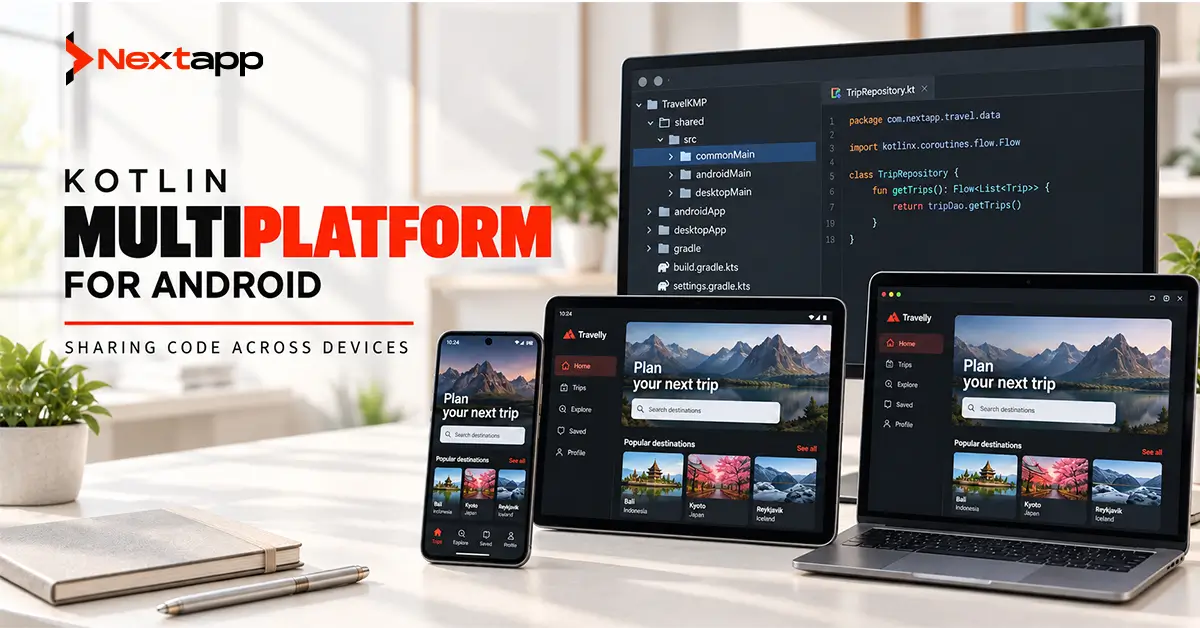
Kotlin Multiplatform allows development teams to share Kotlin code across Android, iOS, desktop, web, and other supported platforms while keeping platform-specific code where it is needed.
For mobile businesses, the most common use case is sharing logic between Android and iOS.
A company may write networking, validation, data models, business rules, caching, and synchronization once instead of maintaining separate Kotlin and Swift implementations of the same behavior.
The Android app can still use native Android APIs and Jetpack Compose. The iOS app can retain Swift, SwiftUI, and Apple-specific functionality.
Kotlin Multiplatform can also go further. Teams using Compose Multiplatform may share portions of the user interface as well.
Google officially supports Kotlin Multiplatform for sharing business logic between Android and iOS, while JetBrains describes the technology as allowing teams to choose how much of an application they want to share.
The important business question is not whether code can be shared.
It is whether sharing it reduces enough duplicated development and maintenance to justify the architecture, tooling, testing, and team changes involved.
What Is Kotlin Multiplatform?
Kotlin Multiplatform, commonly shortened to KMP, is a Kotlin technology that allows the same code to compile for multiple target platforms.
A project can contain:
- Shared Kotlin code
- Android-specific Kotlin code
- iOS-specific code
- Platform-specific dependencies
- Native Android UI
- Native iOS UI
- Shared tests
The amount of shared code is flexible.
A company might share only a pricing calculation module. Another might share networking, repositories, local storage, authentication rules, and business logic.
A third project might share nearly the entire product, including its interface through Compose Multiplatform.
Kotlin Multiplatform does not require an all-or-nothing architecture. Google specifically notes that businesses can begin with a shared module and migrate selected functionality without rewriting the complete application.
How a Kotlin Multiplatform Project Works
A mobile KMP project commonly contains shared and platform-specific source sets.
For example:
- commonMain contains shared Kotlin code.
- androidMain contains Android-specific implementations.
- iosMain contains iOS-specific implementations.
The Android application consumes the shared module much like another library.
The iOS application receives the shared Kotlin code through the corresponding Apple build integration.
Platform-specific dependencies can still be used. A networking library, for example, may use one engine on Android and another on iOS while exposing common behavior to shared code.
This structure allows the application to share what is genuinely common without pretending Android and iOS are identical platforms.
What Code Can Be Shared?
Good KMP candidates are areas where the same rules should behave identically on every platform.
Common examples include:
- Data models
- API communication
- JSON serialization
- Authentication logic
- Validation
- Pricing calculations
- Subscription rules
- Repository logic
- Caching
- Synchronization rules
- Analytics event definitions
- Domain use cases
- Tests
JetBrains identifies business rules, networking, caching, state management, and domain models as common examples of code that teams can share.
Consider a subscription product.
Without shared logic, the Android and iOS teams may separately implement:
- Trial eligibility
- Subscription status rules
- Feature limits
- Account validation
- Pricing calculations
A business rule changed six months later must then be changed and tested twice.
With KMP, those rules may exist in one shared module while both apps maintain their own interfaces.
What Should Usually Remain Platform-Specific?
Not every part of an application needs to be shared.
Platform-specific code may remain appropriate for:
- Native navigation
- Platform-specific UI
- Permissions
- Camera integrations
- Apple or Google payment APIs
- Widgets
- Platform authentication systems
- Platform-specific accessibility behavior
- Highly specialized hardware integrations
KMP supports platform-specific APIs when shared code cannot provide the required implementation. Kotlin provides mechanisms for connecting common declarations with platform-specific implementations.
Maximizing the percentage of shared code should not become the goal.
The goal should be reducing duplicated work without making either platform harder to build.
Kotlin Multiplatform vs. Separate Native Development
One of the clearest ways to evaluate KMP is to compare it with completely separate Android and iOS codebases.
| Area | Kotlin Multiplatform | Separate Native Apps |
|---|---|---|
| Business logic | Can be shared | Implemented separately |
| Android UI | Can remain native | Native |
| iOS UI | Can remain native | Native |
| Platform APIs | Accessible through platform-specific code | Directly available |
| Duplicate logic | Reduced where code is shared | Higher |
| Team coordination | Shared logic requires coordination | Teams can operate more independently |
| Initial architecture | More setup and multiplatform decisions | Familiar native setup |
| Feature consistency | Easier for shared rules | Must be coordinated across codebases |
| Platform specialization | Retained where required | Maximum independence |
| Best fit | Similar product logic across platforms | Products with heavily different platform behavior |
Separate native applications provide maximum independence.
KMP provides a middle ground between completely separate native codebases and frameworks that aim to share the entire mobile application.
Kotlin Multiplatform vs. Traditional Cross-Platform Development
KMP is often grouped with cross-platform frameworks, but its architecture can be different.
A framework such as Flutter commonly encourages significant sharing of both interface and business logic.
Kotlin Multiplatform can share only the portions a company chooses.
| Area | Kotlin Multiplatform | Full Cross-Platform Approach |
|---|---|---|
| Shared business logic | Yes | Yes |
| Shared UI | Optional | Usually a major goal |
| Native Android UI | Can use Jetpack Compose | Depends on framework |
| Native iOS UI | Can use SwiftUI | Depends on framework |
| Gradual adoption | Strong | Depends on framework and existing app |
| Existing native apps | Shared modules can be introduced | Migration may require more restructuring |
| Platform-specific code | Expected where appropriate | Often minimized |
| Main objective | Flexible code reuse | Broad codebase consolidation |
Neither approach is universally better.
A business needs to decide how much platform-specific control it actually needs.
The Business Case for Kotlin Multiplatform
KMP becomes attractive when businesses repeatedly pay for the same logic on different platforms.
Consider a fintech app with separate Android and iOS teams.
Both teams may need to implement:
- Account rules
- Currency calculations
- Transaction validation
- API models
- Error handling
- Synchronization logic
Duplicating those areas does more than increase initial development work.
Every future change must also be:
- Implemented twice
- Reviewed twice
- Tested twice
- Debugged twice
Sharing stable business logic can reduce this duplication.
Google lists code deduplication and gradual adoption among the major benefits of KMP.
The savings, however, depend on the product.
An app with very little shared logic may receive limited benefit.
Where KMP Can Reduce Long-Term Cost
Kotlin Multiplatform can create financial value in several areas.
Shared Feature Development
A new business rule can be implemented once and used across supported platforms.
Reduced Logic Drift
Android and iOS versions are less likely to apply slightly different calculations or validation rules when they depend on the same implementation.
Shared Testing
Common logic can also have common tests.
This can reduce duplicated test maintenance for platform-independent rules.
Faster Feature Parity
When much of a feature exists in shared code, teams may have less duplicated work before releasing equivalent Android and iOS functionality.
Easier Rule Maintenance
Changes to pricing, eligibility, validation, synchronization, and other shared rules can occur in one place.
These benefits are strongest in products with substantial platform-independent logic.
When KMP May Not Save Money
Code reuse creates value only when the shared code is genuinely reusable.
KMP may provide less financial benefit when:
- The app is Android-only.
- iOS is unlikely to be developed.
- Android and iOS products have very different workflows.
- Most development effort sits in platform-specific UI.
- The team lacks Kotlin experience.
- Native platform integrations dominate the product.
- The app is small enough that duplicated logic is inexpensive.
- The product is temporary or has a short expected lifespan.
Adding multiplatform architecture to a simple Android application may increase rather than reduce development cost.
Teams should compare expected maintenance savings against adoption effort.
Kotlin Multiplatform and Android Architecture
KMP should fit into a clear Android architecture rather than replace it.
A shared module may contain:
- Repositories
- Domain use cases
- Data models
- API clients
- Validation
- Synchronization rules
The Android application can then expose this information through ViewModels and UI state.
Teams should establish Android app architecture patterns (MVVM vs. MVI vs. MVP) before deciding which architectural layers belong in shared code.
For example, a business may share repositories and domain logic while keeping Android ViewModels platform-specific. Another team may decide that selected state-management logic is also worth sharing.
Clear ownership matters more than maximizing reuse.
Kotlin Multiplatform and Local Data
Local storage becomes an important consideration when shared business logic relies on cached or offline information.
Android applications commonly use Room for structured local storage.
Google’s current KMP guidance includes support for moving Room databases into multiplatform projects, demonstrating how Android data infrastructure can participate in a wider shared architecture.
A company should first establish an effective Android app data layer design with Room and SQLite before deciding which database abstractions or repositories should become multiplatform.
Poorly designed data responsibilities do not become better simply because they move into a shared module.
Kotlin Multiplatform and Background Work
Background processing is another area where shared and platform-specific concerns need to be separated.
The business rule may be shared.
The operating system scheduling mechanism may not be.
For example, both Android and iOS may share logic that determines which records need synchronization. Android may then use Android WorkManager for background task scheduling to perform persistent work according to Android’s lifecycle and system constraints.
The iOS application uses the corresponding Apple platform mechanisms.
This separation allows the business behavior to remain consistent while each platform handles execution according to its operating system.
Kotlin Multiplatform and Android UI
KMP does not require replacing the Android interface.
An Android application can continue using Jetpack Compose even when large parts of its underlying logic become shared.
A legacy app may also continue using XML layouts.
Businesses evaluating their Android presentation layer should treat Jetpack Compose vs. XML layouts for Android UI as a separate decision from whether networking or business logic should move into KMP.
This prevents a code-sharing initiative from unnecessarily turning into a complete UI rewrite.
Native UI vs. Shared UI With Compose Multiplatform
KMP teams can also choose whether the interface itself should remain native.
| Approach | Shared Logic + Native UI | Shared Logic + Compose Multiplatform UI |
|---|---|---|
| Business logic | Shared | Shared |
| Android interface | Jetpack Compose or Views | Compose Multiplatform |
| iOS interface | SwiftUI or UIKit | Compose Multiplatform |
| UI code reuse | Low | High |
| Native platform conventions | Maximum flexibility | Requires deliberate platform adaptation |
| Platform UI teams | Remain important | Can be more consolidated |
| Best fit | Products prioritizing native platform experiences | Products benefiting from a highly consistent interface |
Google notes that teams may share business logic through KMP and can also use JetBrains' Compose Multiplatform when they want shared UI.
The correct boundary depends on the product.
Gradually Introducing Kotlin Multiplatform
An existing native app does not need a complete rewrite.
A gradual adoption process may begin with one isolated area.
Good candidates include:
- Validation
- Pricing calculations
- API models
- Networking
- Analytics definitions
- Authentication rules
A typical migration may follow these steps:
- Identify duplicated logic.
- Measure how frequently it changes.
- Create a shared KMP module.
- Move one low-risk feature.
- Add shared tests.
- Connect Android and iOS implementations.
- Measure maintenance and development impact.
- Expand sharing only where it proves useful.
Google provides tooling for adding a shared KMP module to existing Android projects, and JetBrains documents migration approaches that move selected logic into shared modules without requiring a full application rewrite.
Team Skills and Development Workflow
Kotlin Multiplatform does not eliminate the need for platform expertise.
A mobile team may still need developers who understand:
- Android APIs
- iOS APIs
- Android lifecycle behavior
- Apple lifecycle behavior
- Platform permissions
- Store requirements
- Accessibility
- Native debugging
iOS development also continues to require Xcode for platform-specific work and application distribution.
KMP changes where shared logic is maintained. It does not make Android and iOS the same operating system.
Common Kotlin Multiplatform Mistakes
Avoid these frequent problems:
- Trying to share 100 percent of the code immediately
- Moving platform-specific behavior into common modules
- Adopting KMP without a second platform requirement
- Measuring success only by percentage of shared code
- Ignoring team training
- Sharing unstable architecture
- Mixing UI migration with data migration unnecessarily
- Assuming shared logic removes platform testing
- Adding unsupported libraries without evaluating alternatives
- Using KMP only because it is a current technology trend
When Should a Business Use Kotlin Multiplatform?
KMP can be a strong choice when:
- Android and iOS are both important.
- Both apps share substantial business logic.
- Maintaining consistent rules is important.
- The Android team already works heavily with Kotlin.
- Native platform experiences still matter.
- The company wants gradual adoption rather than a complete rewrite.
- The product has a long maintenance horizon.
Separate native development may remain more practical when platforms behave very differently or the shared business layer is small.
A complete cross-platform framework may be more suitable when the business prioritizes maximum UI and code reuse.
Professional Android app development services can help evaluate the expected code-sharing percentage, current architecture, iOS requirements, team skills, migration cost, and long-term maintenance before KMP is introduced.
Kotlin Multiplatform Should Reduce Duplication, Not Create It
Kotlin Multiplatform gives businesses a flexible way to share Android and cross-device code without requiring every part of an application to become platform-independent.
Networking, business rules, repositories, validation, data models, and synchronization can often provide strong reuse opportunities.
Android and iOS can still maintain native interfaces and operating-system integrations when those differences provide value.
The best KMP strategy is therefore not the strategy with the highest percentage of shared code.
It is the one where shared code removes meaningful duplicated development while preserving the platform-specific flexibility the product actually needs.
Frequently Asked Questions
What is Kotlin Multiplatform used for?
Kotlin Multiplatform is used to share Kotlin code across platforms such as Android and iOS. Teams commonly share business logic, networking, data models, repositories, validation, and tests.
Is Kotlin Multiplatform officially supported for Android?
Yes. Google officially supports Kotlin Multiplatform for sharing business logic between Android and iOS and provides Android Studio guidance and tooling for KMP projects.
Does Kotlin Multiplatform replace native Android development?
No. Android applications can continue using native Android APIs, Jetpack Compose, and Android-specific services while consuming shared Kotlin modules.
Can Kotlin Multiplatform share the user interface?
Yes. Teams can use Compose Multiplatform to share UI code, or they can share only business logic and retain Jetpack Compose on Android and SwiftUI on iOS.
Is Kotlin Multiplatform cheaper than separate native apps?
It can reduce duplicated development and maintenance when Android and iOS share substantial logic. The financial benefit depends on the amount of reusable code, team skills, migration effort, and product lifespan.
Should an Android-only app use Kotlin Multiplatform?
Usually not unless another supported platform is realistically planned or the shared module has another clear purpose. An Android-only product may gain little value from additional multiplatform architecture.