Android app architecture defines how an application separates its user interface, business rules, state, and data operations.
A clear architecture helps developers understand where code belongs, how information moves through the product, and how one feature can change without breaking unrelated areas.
Poor architecture often produces overloaded activities, fragments, composables, presenters, or ViewModels. Network calls may appear inside screens. Database operations may be repeated across features. Loading and error states may be handled differently from one screen to another.
These problems may remain manageable in a small prototype. They become expensive when the app gains more screens, developers, integrations, user roles, and release requirements.
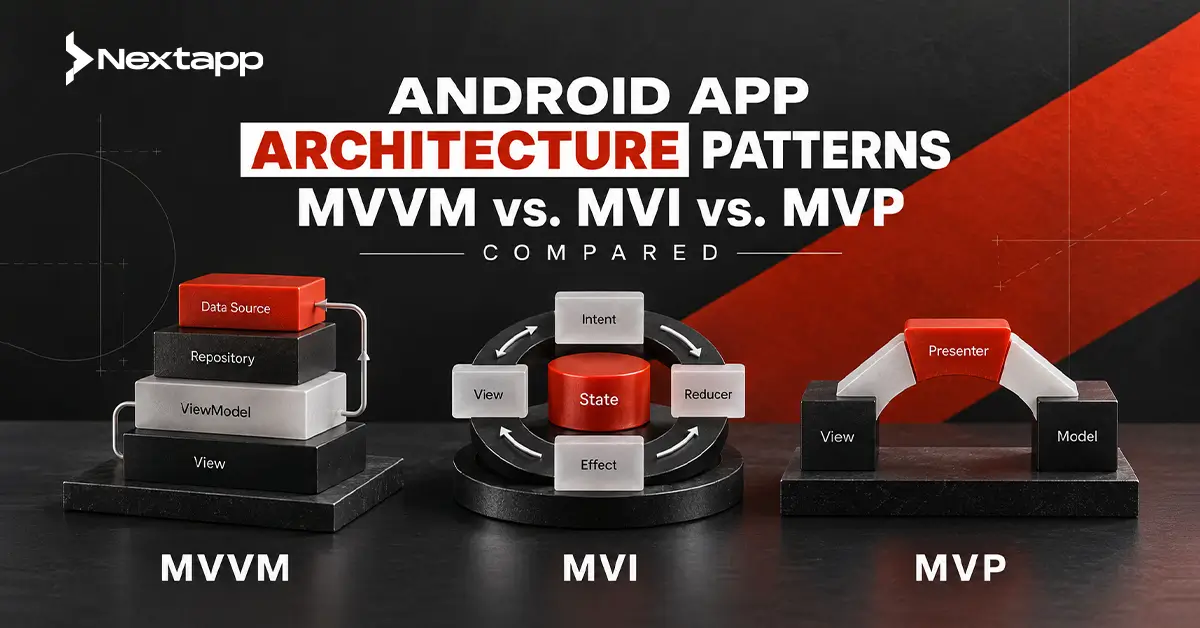
MVVM, MVI, and MVP are three common Android app architecture patterns. Each offers a different way to separate presentation logic from the interface.
No pattern is automatically correct for every Android project. The right choice depends on the app’s state complexity, UI technology, team experience, testing needs, and expected growth.
Android Architecture Is More Than a Pattern Name
Choosing MVVM, MVI, or MVP does not define the complete application architecture.
A production Android app may also contain:
- A user interface layer
- ViewModels or presenters
- Domain use cases
- Repositories
- Local and remote data sources
- Dependency injection
- Background workers
- Platform integrations
- Shared modules
- Automated tests
Google’s current Android guidance recommends clearly defined UI and data layers, repositories, a single source of truth, and unidirectional data flow. It also presents these recommendations as adaptable guidance rather than mandatory rules for every project.
MVVM, MVI, and MVP mainly describe how the presentation layer is organized. They should operate within a wider architecture that also addresses data ownership, business rules, background work, navigation, and testing.
Teams planning the complete product journey should begin with an Android app development guide for startups and enterprises before selecting a presentation pattern in isolation.
MVVM, MVI, and MVP at a Glance
| Area | MVVM | MVI | MVP |
|---|---|---|---|
| Full name | Model-View-ViewModel | Model-View-Intent | Model-View-Presenter |
| Main presentation component | ViewModel | State reducer, store, or ViewModel | Presenter |
| UI communication | UI observes state and sends actions | UI sends intents and renders one state | View calls presenter and presenter updates View |
| State model | One or several observable state holders | Usually one immutable screen state | Often imperative View updates |
| Data direction | Commonly unidirectional | Strictly unidirectional | Commonly two-way interaction between View and presenter |
| Boilerplate | Moderate | Moderate to high | Moderate to high |
| Compose compatibility | Strong | Strong | Possible, but less natural |
| Legacy View compatibility | Strong | Possible | Strong |
| Best fit | Most modern Android business apps | State-heavy and event-heavy screens | Established legacy applications |
| Main risk | Oversized ViewModels | Excessive ceremony for simple screens | Tight View-presenter coordination |
This comparison provides a starting point. The implementation quality matters more than the pattern label.
A project described as MVVM can still contain unclear responsibilities. An MVI implementation can become unnecessarily complicated. An MVP codebase can remain maintainable when its boundaries are consistent and well tested.
What Is MVVM in Android?
MVVM separates the interface into three primary responsibilities:
- Model: Application data and related business operations
- View: Activities, fragments, XML layouts, or composables that display state
- ViewModel: A state holder that prepares data for the View and handles screen-level actions
In a modern Android implementation, the ViewModel may retrieve information through repositories and expose a StateFlow representing the current UI state.
The interface observes that state and renders the appropriate content.
For example, an order screen might expose:
- Loading
- Loaded order
- Empty order
- Payment required
- Error
When the user confirms payment, the interface passes the action to the ViewModel. The ViewModel coordinates the operation through the data or domain layer and updates the state.
Android’s official documentation describes ViewModel as a screen-level state holder that exposes state to the UI, provides access to business logic, and preserves cached state through configuration changes.
Typical MVVM Flow
A simplified MVVM flow may look like this:
- The screen sends an action to the ViewModel.
- The ViewModel calls a repository or use case.
- The repository retrieves or updates data.
- The ViewModel produces a new UI state.
- The screen observes and renders that state.
MVVM does not require the ViewModel to contain every business rule.
Complex or reusable rules may belong in domain use cases. Data access should normally remain in repositories and data sources rather than inside the ViewModel.
Advantages of MVVM
Familiarity Across Android Teams
MVVM is widely used with Android Jetpack components and works naturally with ViewModel, Flow, LiveData, Navigation, Room, and dependency injection.
Many Android developers already understand its basic structure, which can reduce onboarding time.
Compatibility With Compose and Views
MVVM can support both Jetpack Compose and traditional XML interfaces.
A Compose screen may collect immutable state from a ViewModel. A fragment-based screen can observe the same type of state through lifecycle-aware collection.
Businesses deciding how the architecture will interact with the interface should also review Jetpack Compose vs. XML layouts for Android UI. The UI technology may affect implementation details, but it does not require replacing the entire data and domain architecture.
Flexible State Management
MVVM can expose one complete screen state or several independent state properties.
A simple settings screen may use a few small values. A complex checkout screen may use one detailed data class containing customer information, cart status, payment state, validation, and errors.
Strong Testing Potential
ViewModels can be tested without rendering the complete interface.
Tests can provide fake repositories, trigger actions, and verify the resulting state.
Limitations of MVVM
ViewModels Can Become Too Large
A ViewModel may gradually collect:
- Validation
- Navigation decisions
- Network operations
- Database logic
- Analytics
- Permission handling
- Formatting
- Business rules
This creates a large class that is difficult to understand and test.
The solution is not necessarily a new architecture pattern. The team may need clearer repository, domain, navigation, and analytics responsibilities.
State Can Become Fragmented
Several unrelated StateFlow or LiveData properties can make the screen harder to reason about.
One value may show loading while another contains outdated data. An error may not clearly belong to a specific operation.
Using a structured UI state can improve consistency.
MVVM Is Sometimes Implemented as a Label
Renaming a presenter to ViewModel does not create good MVVM.
The ViewModel should expose state, remain independent of UI widgets, and avoid direct dependencies on activities, fragments, or composables.
What Is MVI in Android?
MVI organizes the presentation layer around events, state transitions, and a single rendered state.
The common concepts are:
- Model: The complete UI state
- View: The screen that renders the state
- Intent: A user or system event requesting a change
An intent does not necessarily refer to Android’s Intent class. In MVI, it usually means a user action or event such as:
- Refresh orders
- Submit payment
- Retry request
- Select delivery method
- Apply discount code
The application processes the intent and produces a new state.
Compose works well with this model because composables receive state and expose events. Android’s Compose guidance explains unidirectional data flow as state moving down to the UI while events move upward to a state holder.
Typical MVI Flow
A simplified MVI cycle may be:
- The user creates an intent.
- The ViewModel or store processes it.
- A reducer produces a new state.
- The View renders the state.
- The next event begins another cycle.
The state is usually immutable.
A banking transfer screen might have one state containing:
- Recipient
- Amount
- Validation results
- Transfer fee
- Submission progress
- Confirmation
- Error
Each event produces a predictable state transition.
Advantages of MVI
Predictable State
MVI makes the current screen state explicit.
Instead of several UI controls changing independently, the interface renders one defined state.
This can reduce contradictory conditions such as showing an error and success message at the same time.
Clear Event History
Every meaningful change begins with an event.
This can make complex flows easier to debug because developers can trace which intent produced a particular state.
Strong Fit for Complex Compose Screens
Compose interfaces already work through state and events.
MVI can be effective for screens with several interacting controls, real-time updates, live data, or complex workflows.
Examples include:
- Trading dashboards
- Messaging screens
- Multi-step checkout
- Media editors
- Live logistics tracking
- Complex forms
Testable State Transitions
Tests can provide an initial state, apply an intent, and verify the resulting state or effect.
Limitations of MVI
More Code and Structure
A simple screen may require separate definitions for:
- State
- Intent
- Result
- Effect
- Reducer
- Store or ViewModel
This can create unnecessary ceremony when the feature only loads and displays a small amount of data.
Large State Objects
One complete screen state may become extensive.
Every state copy may contain data that did not change, and developers must keep transitions understandable as the screen grows.
One-Time Effects Need Careful Handling
Navigation, messages, permission requests, and other one-time actions do not always fit ordinary persistent UI state.
Teams need a consistent policy for effects so they are not repeated after configuration changes or lost during lifecycle transitions.
Strict MVI Can Slow Smaller Teams
A formal MVI framework may be useful in a large state-heavy app, but it can slow delivery when the team is maintaining simple forms and content screens.
What Is MVP in Android?
MVP separates presentation into:
- Model: Data and business operations
- View: An interface implemented by an activity, fragment, or custom View
- Presenter: Presentation logic that receives user actions and tells the View what to display
The View usually calls methods on the presenter.
The presenter may then call methods such as:
- showLoading()
- displayOrders()
- showError()
- openConfirmation()
Unlike modern state-driven approaches, MVP often updates the View imperatively.
Typical MVP Flow
A simplified MVP interaction may be:
- The View informs the presenter about a user action.
- The presenter requests data from the model or repository.
- The presenter receives the result.
- The presenter instructs the View which method to call.
- The View updates its controls.
MVP became useful when Android applications placed too much logic inside activities and fragments. The presenter allowed teams to move presentation behavior into a class that could be tested separately.
Advantages of MVP
Useful for Established View-Based Apps
MVP can remain practical when a company already has a large XML and fragment-based application using presenter contracts.
A complete rewrite may introduce more risk than value.
Explicit View Contract
The presenter knows exactly which operations the View supports.
This can make responsibilities clear in smaller legacy screens.
Presenter Unit Testing
Presenters can be tested with fake or mocked View interfaces without launching Android UI components.
Limitations of MVP
Large View Interfaces
A feature may develop a long list of methods such as:
- Show loading
- Hide loading
- Display error
- Clear error
- Enable button
- Disable button
- Show confirmation
These contracts become difficult to maintain as the screen grows.
Manual Lifecycle Coordination
The View and presenter must be attached and detached correctly.
Asynchronous operations may attempt to update a View that no longer exists.
Less Natural for Compose
Compose is designed around rendering state rather than calling imperative UI methods.
MVP can be adapted, but MVVM or MVI-style state management generally aligns more naturally with Compose.
Navigation and Effects Can Become Coupled
Presenters may directly instruct screens to open routes or display dialogs, which can make platform dependencies harder to isolate.
Detailed MVVM vs. MVI vs. MVP Comparison
| Decision Factor | MVVM | MVI | MVP |
|---|---|---|---|
| Learning curve | Moderate | Higher when strict reducers and effects are introduced | Moderate for developers familiar with Views |
| Boilerplate | Moderate | Often highest | Moderate to high |
| UI state clarity | Good with structured state | Very strong | Depends on View contract |
| Complex event handling | Good | Strong | Can become difficult |
| Small screen efficiency | Strong | May be excessive | Acceptable |
| Large state-heavy screen | Strong with discipline | Often strongest | Presenter and View contract may grow substantially |
| Compose integration | Natural | Natural | Less natural |
| XML and View integration | Natural | Supported | Natural |
| Test isolation | Strong | Strong | Strong |
| Debugging state changes | Good | Strong because transitions are explicit | Depends on presenter flow |
| Legacy suitability | Strong | Usually unnecessary unless introduced gradually | Strong |
| Team onboarding | Usually easiest | Requires shared conventions | Practical for teams already using MVP |
Architecture Selection by Team and Product Size
Small Team With a Focused App
A small team building a straightforward application will usually benefit from MVVM.
Examples include:
- Appointment booking
- Content subscriptions
- Customer portals
- Basic e-commerce
- Service requests
Use one ViewModel per screen or navigation destination, a clear repository layer, and structured UI state.
A strict MVI framework may add more code than the product needs.
Growing Product With Several Features
MVVM with unidirectional data flow is often appropriate.
The team can introduce:
- Domain use cases
- Feature modules
- Dependency injection
- Standardized UI-state models
- Shared testing utilities
The architecture can remain understandable while the product grows.
Complex State-Driven Application
MVI may be valuable when screens have numerous actions and state transitions.
Examples include:
- Real-time trading
- Complex messaging
- Live operations
- Advanced checkout
- Collaborative editing
The team should be comfortable defining states, events, reducers, and effects consistently.
Large Legacy Android Product
MVP may remain the safest option for existing features.
New modules can use MVVM or another modern state-driven approach without forcing an immediate rewrite of stable code.
A mixed architecture is acceptable when boundaries are clear and teams understand why different modules follow different patterns.
Architecture and the Data Layer
MVVM, MVI, and MVP do not replace repositories or data sources.
A presentation component should not directly manage every API request, SQL query, file operation, and Bluetooth connection.
The data layer should define how information is retrieved, stored, synchronized, and updated.
Android’s architecture guidance recommends repositories as the entry point to application data and a single source of truth for each type of data. In an offline-first product, that source may be a local database.
The dedicated guide on Android app data layer design with Room and SQLite should be used to establish:
- Entities
- Data access objects
- Repositories
- Caching
- Synchronization
- Database migrations
- Offline behavior
Keeping these responsibilities outside ViewModels and presenters prevents the presentation layer from becoming tied to one storage implementation.
Architecture and Background Work
Some operations must continue after a screen closes.
Examples include:
- Uploading files
- Synchronizing offline records
- Refreshing cached data
- Completing deferred processing
These responsibilities do not belong inside a ViewModel simply because the action began on a screen.
A ViewModel can request the operation and observe its status, while an appropriate background component performs the persistent work.
A focused guide to Android WorkManager for background task scheduling can help teams separate immediate UI operations from persistent jobs that must survive process termination or wait for constraints such as network availability.
Architecture and Kotlin Multiplatform
Kotlin Multiplatform may affect where business logic is placed.
A company can share:
- Data models
- Validation
- Networking
- Repositories
- Use cases
- State-management logic
The Android interface can still use ViewModel and Compose, while another platform provides its own UI.
Google officially supports Kotlin Multiplatform for sharing business logic between Android and iOS, while teams may choose native or shared interfaces according to their needs.
The business case should be assessed through Kotlin Multiplatform for Android and cross-device code sharing, especially when the company expects Android and iOS to follow similar rules but retain platform-specific user experiences.
Common Android Architecture Mistakes
Avoid these frequent problems:
- Selecting a pattern because it is fashionable
- Treating activities or composables as the complete architecture
- Placing database and network logic inside the UI
- Creating oversized ViewModels
- Creating presenters with large View contracts
- Using MVI for screens with almost no meaningful state
- Adding a domain layer without reusable business logic
- Mixing navigation, analytics, storage, and validation in one class
- Hiding responsibilities behind vague utility classes
- Applying different state conventions to every feature
- Rewriting a stable legacy app without a migration case
- Failing to test state transitions
How to Migrate an Existing Architecture
A company does not need to rewrite the complete application before improving its architecture.
A gradual process may include:
- Identify features with the highest maintenance cost.
- Separate network and database access into repositories.
- Introduce structured screen state.
- Move UI logic from activities or fragments into ViewModels.
- Add tests around existing behavior.
- Migrate one feature at a time.
- Measure defects, delivery speed, and developer effort.
Compose can also be introduced gradually into an existing View-based app. The architecture of the data and business layers does not need to change simply because one screen moves from XML to Compose.
Avoid converting code only to match a new label. Migration should improve testability, consistency, developer understanding, or feature delivery.
Choosing the Right Pattern
MVVM is the strongest default for many modern Android applications because it works naturally with ViewModel, Compose, Flow, repositories, and structured UI state.
MVI is valuable when state transitions are complex enough to justify stricter event and reducer conventions.
MVP remains suitable for established legacy applications where presenter contracts are already tested and understood.
The decision should consider:
- Application complexity
- Number of developers
- Existing code
- Compose or XML usage
- Amount of UI state
- Offline behavior
- Testing expectations
- Cross-platform plans
- Maintenance horizon
Professional Android app development services can help technical and business teams assess these factors, establish architectural boundaries, design a migration plan, and prevent framework decisions from becoming disconnected from product requirements.
Frequently Asked Questions
Which Android architecture pattern is best?
MVVM is a practical default for many modern Android applications. MVI may suit complex state-heavy screens, while MVP can remain appropriate for established View-based legacy products.
Is MVI better than MVVM?
MVI is not universally better. It provides stricter and more predictable state transitions but often requires more code. MVVM may be simpler and faster for ordinary business applications.
Can MVVM use unidirectional data flow?
Yes. A ViewModel can expose immutable UI state while the interface sends actions upward. Android currently recommends unidirectional data flow principles for modern UI architecture.
Is MVP outdated for Android development?
MVP is less aligned with modern Compose development, but it can still be maintainable in existing XML and View-based applications. A working MVP codebase does not require an automatic rewrite.
Can one Android app use more than one architecture pattern?
Yes. A legacy module may use MVP while newer features use MVVM. Different screens may also apply stricter MVI-style state handling when justified. The boundaries and conventions should remain clear.
Does app architecture affect development cost?
Yes. Clear architecture can reduce regression risk, testing effort, and maintenance difficulty. Excessive abstraction can also increase development time, so the structure should match the product’s real complexity.