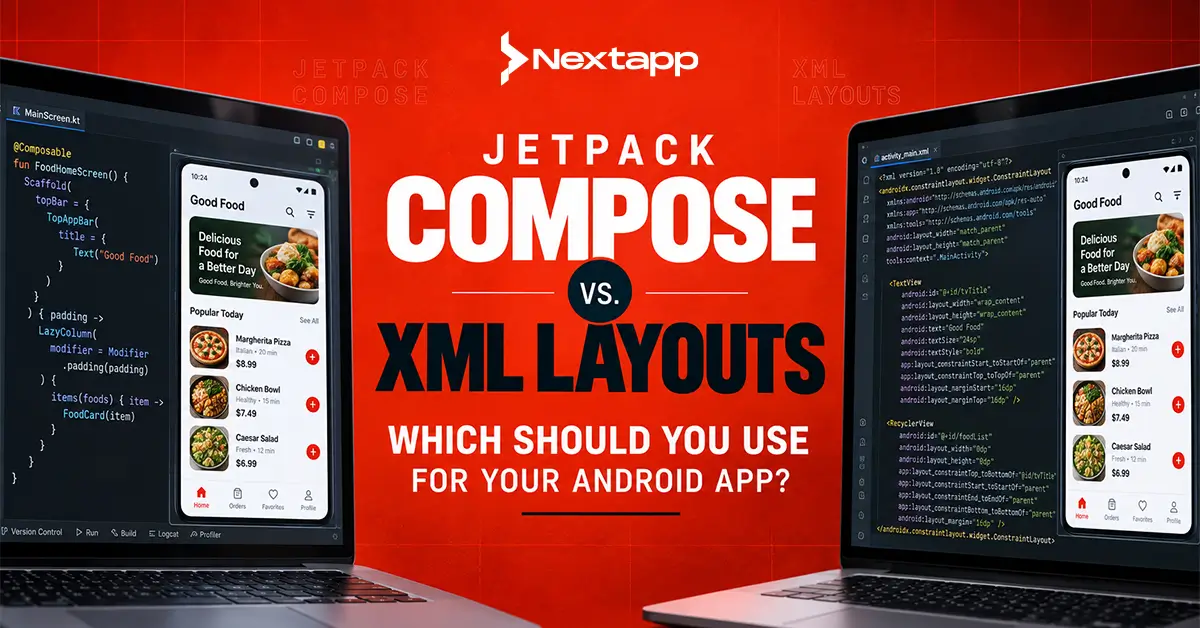
Jetpack Compose and XML layouts are two approaches to building Android user interfaces.
Jetpack Compose is Android’s modern declarative UI toolkit. Developers create interface components directly in Kotlin and describe how the UI should respond to application state.
XML layouts follow Android’s traditional View system. Developers define much of the screen structure in XML files and connect those layouts with Kotlin or Java code.
For a new Android application, the decision is becoming increasingly straightforward. Google now describes Android development as Compose-first and considers the traditional View toolkit to be in maintenance mode, although Views continue to be supported and interoperability remains available.
The decision becomes more complicated for an established business with hundreds of XML layouts, custom Views, existing tests, trained developers, and years of production code.
Moving to Compose may improve long-term development, but rewriting a stable application simply because a newer toolkit exists can introduce unnecessary cost and risk.
The right Jetpack Compose vs. XML layouts decision therefore depends on whether the business is building a new product, extending a legacy application, or planning a gradual modernization program.
What Is Jetpack Compose?
Jetpack Compose is a Kotlin-based declarative toolkit for creating native Android interfaces.
Instead of defining a screen in an XML layout and manually changing individual Views, developers create composable functions that describe what the screen should display for a particular application state.
A simplified screen might depend on states such as:
- Loading
- Content available
- Empty
- Error
- Submission in progress
- Success
When the state changes, Compose updates the affected interface.
This model works naturally with modern Android architecture patterns in which ViewModels expose UI state and the interface sends user events back to a state holder.
Teams planning the wider codebase should consider Android app architecture patterns (MVVM vs. MVI vs. MVP) alongside their UI decision. Compose does not force one architecture pattern, but its state-driven model aligns particularly well with MVVM and unidirectional data flow.
What Are XML Layouts?
XML layouts belong to Android’s traditional View-based UI system.
A developer may define a screen using XML elements such as:
- TextView
- Button
- EditText
- ImageView
- ConstraintLayout
- LinearLayout
- RecyclerView
The layout is then inflated and controlled through an Activity, Fragment, View binding, data binding, or related Kotlin or Java code.
XML-based Android development has been used for many years, which means businesses may have mature applications containing extensive View code, custom components, third-party libraries, test suites, and developer knowledge built around it.
XML is therefore not automatically a poor choice simply because Compose is newer.
The business question is whether continuing to invest in the current View-based system makes sense for the product’s future.
Jetpack Compose vs. XML Layouts at a Glance
| Area | Jetpack Compose | XML Layouts |
|---|---|---|
| UI approach | Declarative | Traditional View-based |
| Primary language | Kotlin | XML with Kotlin or Java |
| New Android apps | Strong choice and current Google direction | Possible, but generally less attractive for new projects |
| Existing legacy apps | Can be introduced incrementally | Already established in many mature apps |
| State-driven UI | Built naturally around state | Requires more manual View updates |
| Reusable components | Composable functions | Custom Views, layout resources, styles |
| Preview tools | Compose Preview and related tooling | Android layout editor and previews |
| Migration requirement | None for new apps, gradual migration possible for legacy apps | No migration required when maintaining existing View code |
| Team ramp-up | Requires Compose and declarative UI knowledge | Familiar to experienced legacy Android teams |
| Long-term direction | Compose-first | View toolkit in maintenance mode |
| Interoperability | Can contain traditional Views | Can contain Compose through ComposeView |
Compose and Views can coexist in the same application, which is one of the most important factors for businesses evaluating migration. Google explicitly recommends incremental migration rather than rewriting an existing View-based interface all at once.
Jetpack Compose Advantages
Less Separation Between UI Files and Kotlin
Traditional Android screens often divide interface structure across XML and Kotlin or Java files.
Compose keeps the interface in Kotlin.
A developer can define:
- Layout
- State behavior
- Conditional content
- Theming
- Reusable components
within the same programming environment.
This can make components easier to trace because developers do not need to move constantly between layout resources and application code.
Declarative State Management
Compose describes what should appear for the current state instead of requiring developers to manually update several Views.
Consider a checkout screen.
A View-based implementation might manually:
- Hide the loading indicator
- Show the cart
- Enable the payment button
- Update the price
- Remove an old error
- Display a shipping message
With Compose, a defined state can determine which components appear and how they behave.
This does not eliminate state-management problems, but it can make the relationship between application state and interface output clearer.
Reusable UI Components
Composable functions can be small and reusable.
A team may create shared components for:
- Buttons
- Form fields
- Product cards
- Error messages
- Dialogs
- Loading states
- Navigation
- Empty states
These components can be tied to a broader design system, helping maintain visual consistency as the app grows.
Strong Support for Modern Android Development
Google now develops Android guidance, samples, libraries, and training with a Compose-first direction. Traditional Views remain supported, but the View toolkit is currently described by Google as being in maintenance mode.
For businesses starting a new Android project expected to remain active for several years, this direction matters.
Jetpack Compose Limitations
Team Learning Curve
Developers experienced primarily with XML may need time to understand:
- Composable functions
- Recomposition
- State hoisting
- Side effects
- Remember APIs
- Lifecycle-aware state
- Declarative UI patterns
A company should not assume that developers will become equally productive immediately after changing frameworks.
Training time should be included in migration planning.
Existing View Dependencies
Some mature applications depend on:
- Custom Views
- Complex RecyclerView implementations
- Third-party View libraries
- Old SDK components
- Specialized charts
- Advertising Views
- Legacy media controls
Compose can integrate with existing Views through interoperability APIs such as AndroidView, while View-based layouts can host Compose through ComposeView.
This reduces migration pressure, but it also means a transitional application may contain two UI systems for some time.
Migration Requires Testing
Replacing a working interface creates regression risk.
A migrated screen may look correct but behave differently when:
- Text size increases
- The device rotates
- Data reloads
- Navigation changes
- Accessibility services are enabled
- The process is recreated
Google recommends using UI testing during migration to reduce regressions.
XML Layout Advantages
Existing Code Does Not Need to Be Rewritten
The largest advantage for mature apps is simple: the interface already works.
A company may have:
- Hundreds of screens
- Years of bug fixes
- Automated tests
- Stable custom Views
- Developers experienced with the system
Replacing this code creates cost even when users receive no visible new functionality.
Migration needs a business reason.
Experienced Teams May Remain Productive
A team with deep XML knowledge can often deliver features quickly within an existing architecture.
Moving every developer to Compose at once may initially reduce productivity.
This matters when the company has a full roadmap and cannot pause feature development for a large technical migration.
Existing Libraries and Custom Components
Legacy products may depend on UI components designed specifically around the traditional View system.
Rebuilding those elements may provide little immediate business value.
Interoperability allows teams to retain necessary View components while gradually introducing Compose elsewhere.
XML Layout Limitations
More Imperative UI Management
View-based screens frequently require developers to manually update UI elements as application state changes.
Complex screens can therefore accumulate several independent updates for loading, errors, visibility, buttons, text, and content.
Without careful architecture, the screen can become difficult to reason about.
Growing Gap From Android’s Current Direction
Views remain supported, but Android’s current tooling and learning direction is Compose-first.
A company maintaining a View-based product should therefore consider future developer hiring, new libraries, internal expertise, and the expected remaining lifespan of the application.
New Android App: Compose or XML?
For most new native Android applications, Jetpack Compose is the stronger default.
A new project does not carry migration costs, so the team can establish Compose components, theming, navigation, accessibility, and testing conventions from the beginning.
A new project might still use a traditional View when a required SDK or specialized component does not yet have an appropriate Compose implementation. Compose supports embedding such Views when needed.
UI technology is only one part of the overall product decision. Startups and enterprises defining a new product should begin with an Android app development guide for startups and enterprises to determine architecture, backend requirements, security, testing, device support, and rollout strategy alongside the interface toolkit.
Existing Android App: Rewrite or Migrate Gradually?
A full rewrite is usually the highest-risk approach.
Google recommends an incremental migration in which Compose and Views coexist. Its suggested strategy begins by building new screens in Compose, developing reusable Compose components, and replacing existing features gradually.
A business can therefore continue delivering product work while modernizing selected parts of the application.
Migration Options Compared
| Strategy | Benefits | Risks | Best Fit |
|---|---|---|---|
| Continue with XML | Lowest immediate disruption | Technical direction remains tied to legacy View architecture | Stable apps with limited future development |
| Full Compose rewrite | Clean Compose-only result | Highest cost and regression risk | Rare cases where the existing UI is already being replaced substantially |
| Incremental migration | Spreads cost and risk over time | Temporary mixed UI architecture | Most actively maintained legacy apps |
| Compose for new features only | Fast way to gain Compose experience | Old screens may remain indefinitely | Teams beginning modernization cautiously |
Incremental migration usually provides the best balance for an actively developed legacy application.
A Practical Compose Migration Process
A controlled migration can follow these stages.
1. Assess the Existing UI
Identify:
- Simple screens
- Frequently changed screens
- Stable screens
- Custom Views
- Third-party dependencies
- Navigation dependencies
- Existing tests
Do not begin with the most complicated screen simply to prove Compose can handle it.
2. Train the Team
Developers need practical experience before major migration work begins.
Start with small components and internal screens where errors have limited business impact.
3. Build New Screens in Compose
Google recommends new screens as an effective starting point for Compose adoption.
This allows the team to learn the toolkit without rewriting working UI.
4. Build Shared Components
Create common Compose elements for buttons, inputs, cards, dialogs, loading states, and design-system patterns.
This prevents each migrated screen from inventing its own implementation.
5. Migrate Simple Existing Screens
Move stable, understandable screens before tackling highly interactive workflows.
6. Test the Mixed Application
A transitional application contains both Compose and Views.
Test navigation, accessibility, lifecycle behavior, themes, state restoration, and interactions between both systems.
Architecture Should Not Be Rewritten With the UI
Moving XML layouts to Compose does not mean the entire application must be redesigned.
Repositories, APIs, business logic, and local databases can often remain unchanged when their boundaries are already sound.
For example, an application using a clean Android app data layer design with Room and SQLite can expose the same repository data to a Compose ViewModel that previously supported a Fragment.
Keeping UI migration separate from data migration reduces risk.
Compose Migration and Background Tasks
A user-interface rewrite should also avoid changing reliable background infrastructure without a reason.
File uploads, offline synchronization, and deferred operations may already run independently of the current screen.
A product using Android WorkManager for background task scheduling can continue that architecture while migrating its visible UI to Compose.
Keeping persistent business operations independent from the screen also makes future UI changes easier.
Compose and Cross-Device Development
Companies planning both Android and iOS may also evaluate Kotlin Multiplatform for Android and cross-device code sharing.
Kotlin Multiplatform can share selected business and data logic while Android uses Compose for its native interface.
This is different from migrating XML to Compose.
Compose concerns the Android UI layer. Kotlin Multiplatform concerns which underlying Kotlin logic can be shared across platforms. Treating these as separate decisions helps avoid turning an interface migration into an unnecessarily large architecture project.
How to Choose Between Compose and XML
Choose Jetpack Compose when:
- You are building a new Android app.
- The team is comfortable with Kotlin.
- The product has a long development roadmap.
- UI changes are frequent.
- You want to align with Android’s current development direction.
- The team is prepared to adopt declarative UI patterns.
Continue using XML where appropriate when:
- The application is mature and stable.
- Development is limited mainly to maintenance.
- Important custom Views have no practical replacement.
- A migration would consume budget without improving product delivery.
- The team cannot currently absorb migration and training work.
Use incremental migration when:
- The app is actively developed.
- The company expects to maintain it for several more years.
- New features can be built in Compose.
- Existing View screens can be replaced gradually.
- The team needs to control migration risk.
Professional Android app development services can help audit an existing View-based app, identify suitable migration candidates, establish Compose standards, and estimate whether modernization will reduce long-term maintenance enough to justify its cost.
Frequently Asked Questions
Is Jetpack Compose better than XML layouts?
Jetpack Compose is generally the stronger choice for new Android applications because it aligns with Android’s current Compose-first direction. XML layouts may remain appropriate for stable legacy applications.
Is XML still supported for Android development?
Yes. Android Views remain supported, although Google currently describes the View toolkit as being in maintenance mode while its development direction is Compose-first.
Do I need to rewrite my XML app to use Compose?
No. Compose and Views are interoperable. Google recommends incremental migration for existing View-based applications rather than requiring a complete rewrite.
Can Jetpack Compose and XML be used in the same app?
Yes. Compose can be placed inside View-based interfaces using ComposeView, and traditional Views can be embedded inside Compose using interoperability APIs such as AndroidView.
How long does it take developers to learn Jetpack Compose?
The time varies according to Kotlin experience and familiarity with declarative UI. Teams should account for training, conventions, code review, and real project practice rather than assuming immediate productivity.
Should an enterprise rewrite its legacy Android UI in Compose?
Not automatically. A rewrite should be justified by maintenance cost, roadmap requirements, developer productivity, or technical limitations. Incremental migration is often safer for actively maintained enterprise applications.